STM32 Coder Options
The Target page contains code generation options which are specific to the STM32 Target Support Package.
General
- Chip
Selects the target device chip series.
- Package size
Selects the number of pins of the chip.
- Memory size
Select the Flash memory size of the chip.
- Full chip name
Read only field that displays the full chip name according to the selected chip, pin count and memory size.
- System clock frequency (SYSCLK)
Specifies the system clock frequency in megahertz \((\mathrm{MHz})\).
- Use internal oscillator
Selects the on-chip oscillator as the clock source. The clock frequency is automatically specified based on the target device.
- External clock frequency
Specifies the frequency in megahertz \((\mathrm{MHz})\) of the external clock source when the internal oscillator is not used.
- External ADC reference
Specifies the external reference for VREF+ in volts \((\mathrm{V})\). VREF+ is the positive reference voltage for an analog input (ADC) or output (DAC) signal. VREF+ range is \(1.62\,\mathrm{V}\leq\) VREF+ \(\leq\) VDDA, where VDDA is analog power supply (\(1.62\,\mathrm{V}\leq\) VDDA \(\leq 3.6\,\mathrm{V}\)).
- Step size tolerance
The desired control task frequency may not be achievable based on the system clock frequency and the nominal discretization time step. This setting configures the Coder to either
Enforce exact valueby generating an error when the exact control task frequency is unachievable or to automaticallyRound to closest achievable value.- Step size tolerance band
Specifies the acceptable deviation in frequency from the specified value when the exact control task frequency is unachievable, in percent \((\%)\).
- Build type
This setting specifies the action of the Build button.
Generate code into STM32CubeIDE projectwill generate code into the specified STM32CubeIDE project. STM32CubeIDE must then be used to build the project and flash the MCU. TheBuild onlyoption will generate the code and build it. The resulting binary file must then be flashed on the MCU by using a third-party tool, e.g. the STM32CubeProgrammer. TheBuild and programoption will automatically build and flash the target device from within PLECS.- STM32CubeIDE project directory
Specifies the target folder for code generation. The code must be generated into a pre-configured STM32CubeIDE project. When using the STM32CubeIDE project templates provided with the STM32 target support package, code must be generated into the
${workspace_loc}/cube_g4xx/cgor${workspace_loc}/cube_f3xx/cgfolder where${workspace_loc}refers to the location of the imported project in the STM32CubeIDE workspace.- Programming interface
Provides an option to automatically program the target MCU from PLECS after it finishes generating and building code. Programming occurs over the GNU debug protocol and requires a GDB server. There are two options available:
Open OCD Supports the Open On-Chip Debugger package and GDB server, supporting the ST-LINK debug link out of the box (no external tools needed).
Segger J-Link Supports Segger debug probes, which offer superior throughput. The Segger J-Link tools must be downloaded and installed separately.
- OpenOCD configuration
Allows to set a
CustomOpenOCD configuration script to establish the connection to the target device.- Autoprobe connected device
Enables the option to automatically check if the device that is connected to the host computer matches the configured
Chip. If a different chip is detected the build process aborts with an error message.- Specify serial number
Enables the option to specify a serial number to identify a target MCU. This is of interest when several targets are connected at the same time to the same host computer.
- Serial number
Allows to specify the serial number of the target. The serial number of a STM32 chip can be identified with third-party tools, e.g. STM32CubeProgrammer. The entry is interpreted as a string and variables are therefore not evaluated.
- Generate pinmap file
Specifies if a pinmap should be generated during the build process. If set to
Generic boarda generic table independent from any hardware board is generated. The table shows a summary of all input and output pins used in the model for which code is generated for. If set toNucleo-64 boardthe input and output pins required by the simulation model are mapped to the respective ST morpho connector pins (CN7 and CN10) of a Nucleo 64 pin based board. The pinmap is generated as a .html file in theOutput directoryas specified in the General tab of the Coder Options dialog.
Advanced
- Task scheduler
Specifies if the task scheduling is based on FreeRTOS™ or a light-weight bare-metal dispatch routine (
Bare-metal). The bare-metal dispatch routine is more efficient compared to FreeRTOStexttrademarkand allows the user to reach higher execution rates of the base task. However, only up to 6 different tasks are allowed.- Freeze timer when pausing the debugger
If set to
Enabled, all timers are paused when a breakpoint is hit during debugging. This parameter is only visible if the Build type is set toGenerate code into STM32CubeIDE project.
Protection
Analog inputs can be configured on this tab to generate trip events for the Powerstage Protection block. Note that in order for a protection input to have an effect it has to be explicitly activated in the Protection tab of the Powerstage Protection block.
Analog protection signals
Up to seven analog comparators can be enabled and configured for generating trip signals for the Powerstage Protection block.
The configured sense port/pin must be connected to a positive (\(+\)) comparator GPIO. The comparator is automatically determined by PLECS and an error message is issued in case no suitable comparator is found.
The user can configure a fault threshold voltage. Note that the fault threshold voltage has to be set to a value between \(0.0\,\mathrm{V}\) and \(3.3\,\mathrm{V}\). The fault threshold is internally generated with a digital-to-analog converter (DAC), connected to the negative (\(-\)) comparator pin, as shown in the figure below.
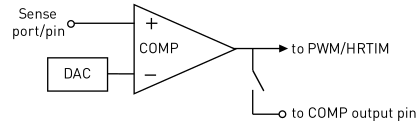
Fig. 15 Setup for an analog protection signal.
- Enable analog protection signal 1-7
Enables an analog protection signal.
- Sense port
Specifies the port used for the analog signal connection.
- Sense pin
Specifies the pin used for the analog signal connection.
- Trip behaviour
Selects the polarity of the trip signal. If set to
Trip if signal is below thresholdthe trip signal will be emitted if the connected analog signal value is below the configured Fault threshold value. If set toTrip if signal is above thresholdthe trip signal will be emitted if the connected analog signal value is above the configured Fault threshold value.- Fault threshold voltage
Configures the fault threshold in volts \((\mathrm{V})\). The value has to be between \(0.0\,\mathrm{V}\) and \(3.3\,\mathrm{V}\).
- Comparator output
Selects if the output signal of the comparator should be fully internal or also connected to a specified pin. If set to
Internalthe output signal of the comparator is internal only and not accessible. If set toInternal and externalthe output signal of the comparator is also available for further usage at a specified pin of the MCU, see graphic above.- Comparator output port
Specifies the port used to output the comparator output signal.
- Comparator output pin
Specifies the pin used to output the comparator output signal.
External Mode
These options are used to configure the External Mode communication with the target device. This choice must be configured prior to building the project.
- External Mode
This setting adds code to the target device that enables the External Mode. Code size and memory consumption are increased when the External Mode is enabled. There are two communication options available,
SerialorJTAG.
Target buffer size
Specifies how much target memory (16-bit words of RAM) should be allocated to buffering signals for the external mode. The number of words \(N_\mathrm{w}\) required by the external mode can be calculated as follows: \(N_\mathrm{w}=N_\mathrm{signals}\cdot 2 \cdot (N_\mathrm{samples}+1)\). If more samples are requested than what is supported by the memory allocation, PLECS will automatically truncate the scope traces to the maximal possible \(N_\mathrm{samples}\) value. Note, however, that requesting more memory than what is available on the target will result in a build error. Recommended values for this setting are in the range of \([500...2000]\) for STM32F3xxRE or STM32G4xxRx chips. For chips that can be identified with STM32F3xxR8, the target buffer size should be in the range of \([100...500]\).
- USART Rx Port
Specifies the Rx port used for the External Mode USART connection.
- USART Rx Pin
Specifies the Rx pin used for the External Mode USART connection. This pin cannot be used by other peripherals.
- USART Tx Port
Specifies the Tx port used for the External Mode USART connection.
- USART Tx Pin
Specifies the Tx pin used for the External Mode USART connection. This pin cannot be used by other peripherals.
- Debug interface
Provides an option to communicate with the target MCU from PLECS after building code from STM32CubeIDE. Communication occurs over the GNU debug protocol and requires a GDB server. There are two options available:
Open OCD Supports the Open On-Chip Debugger package and GDB server, supporting the ST-LINK debug link out of the box (no external tools needed).
Segger J-Link Supports Segger debug probes, which offer superior throughput. The Segger J-Link tools must be downloaded and installed separately.