Advanced PWM Generation on STM32 Microcontrollers
Overview
In this STM32 demo model you will learn how to generate frequency-variable and phase-shifted PWM signals on STM32 microcontrollers (MCUs) with the PLECS Coder and the STM32 Target Support Package (TSP).
It provides an explanation of the typical workflow of the PLECS Coder for embedded targets, using an STM32G4x or STM32F3x microcontroller from STMicroelectronics.
Shows typical configurations to generate frequency-variable and phase-shifted PWM signals.
Shows how PWM signals can be captured and evaluated on a STM32 MCU.
The following sections provide a description of the model and instructions on how to simulate the model, and deploy the control code to the STM32 target.
Requirements
In order to run this model you will need:
One STM32 Nucleo board supported by the PLECS STM32 TSP
Two jumper wires
Note
Model
The top-level schematic contains two subsystems, one for variable-frequency PWM generation and the second for generating phase-shifted PWM signals. Generating frequency-variable PWM signals is available on all supported targets of the STM32 TSP. Phase-shifted PWM signals can only be generated on targets that feature the high resolution timer (HRTIM) peripheral.
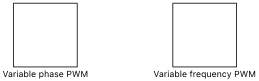
Fig. 1 Top level schematic of the demo model
In each of the two top-level subsystems you can find distinct subsystems called “G431RB”, “G474RE”, “G491RE”, “F303RE”, or “F334R8”. Each subsystem can be independently deployed to the corresponding STM32 hardware. The target specific subsystems are enabled for code generation, as indicated by the thick outer border of the subsystem blocks. This configuration is necessary to generate the model code for a subsystem via the PLECS Coder.
The generated code runs at a base sample time on the MCU. This sample time also defines how the continuous states of the model equations are discretized. The sample time is configured in by the Discretization step size setting in the Scheduling tab of the Coder > Coder Options… window. In this model, the discretization step size of each of the subsystems is set to \(100\,\mu\mathrm{s}\).
Frequency Variable PWM Signal Generation
Generating frequency-variable PWM signals is possible on all targets supported by the STM32 TSP. You can find six target-specific subsystems in the “Variable frequency PWM” subsystem.
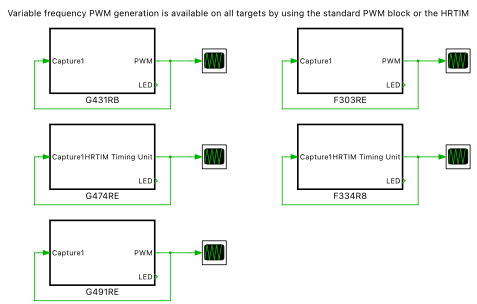
Fig. 2 Top level schematic to generate variable frequency PWM signals
Each subsystem includes a model to generate frequency-variable PWM signals by using the standard PWM block or the HRTIM blocks from the STM32 Target component library.
PWM setup
Variable frequency PWM generation can be achieved by using the standard pwm_stm32 from the STM32 Target component library. It can be activated by setting the Frequency variation parameter in the mask dialog of the PWM block to Enabled. An additional target inport terminal \(f'\) is shown and acts as a scaling factor to the nominal carrier frequency configured in the Carrier frequency mask dialog parameter. The resulting PWM frequency is calculated as \(f_{\rm PWM} = f' \cdot f_{\rm nom}\), where \(f_{\rm nom}\) is the nominal carrier frequency in hertz \((\mathrm{Hz})\).
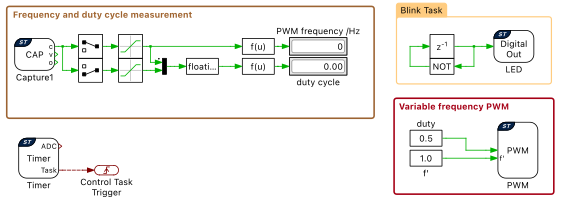
Fig. 3 Setup to generate frequency-variable PWM signals with the PWM target block
HRTIM setup
Variable frequency PWM signals can also be generated based on the HRTIM peripheral. A typical setup is shown in Fig. 4. The hrtim_timing_unit_stm32 has to be synchronized to a hrtim_master_stm32. Frequency variation can be enabled in the HRTIM Master block dialog mask and an additional \(f'\) terminal will be shown at the HRTIM Master block. Also in this case the \(f'\) terminal acts as a scaling factor to the nominal carrier frequency.
Note
Keep in mind that the HRTIM prescaler is set during the initialization process of the MCU, and cannot be changed during operation. Therefore, in case of variable frequency operation, the Carrier frequency parameter should be selected as the lowest frequency required during operation.
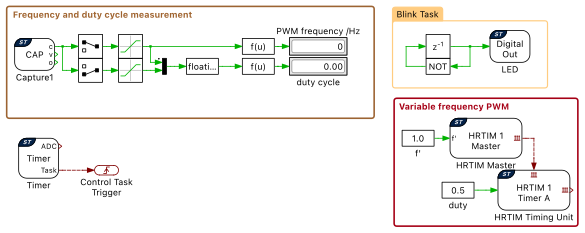
Fig. 4 Setup to generate frequency-variable PWM signals with the HRTIM target blocks
PWM Capture
A capture_stm32 is used to evaluate the PWM signal during operation. The Capture block is configured to operate in the PWM capture mode and allows to extract the PWM frequency and duty cycle from a connected physical signal. The first signal that is output at the \(c\) terminal is a counter value representing the PWM period, the second output represents the duty cycle.
The actual PWM frequency can be reconstructed as \(f_{\rm PWM} = f_\mathrm{SYSCLK} / c_{\rm period}\), where \(c_{\rm period}\) represents the first \(c\) output value of the Capture block and \(f_\mathrm{SYSCLK}\) the system clock frequency in hertz \((\mathrm{Hz})\).
Simulation
Each subsystem can be directly converted into target specific code for the corresponding STM32 hardware.
Flash the MCU
Follow the instructions below to upload one of the subsystems to an STM32 MCU.
Connect the desired MCU to the host computer through a USB cable.
Open the Coder > Coder Options… window, and in the System menu on the left-hand side, select the MCU of interest.
To deploy the MCU target directly from PLECS click Build.
If programmed correctly, the green LED (LD2) on the STM32 board should blink.
Connect the hardware
Next, connect the pins listed below using a jumper wire for the desired MCU, according the Fig. 5
G431RB: Connect PA8 (CN10-23) to PA6 (CN10-13)
G474RE: Connect PA8 (CN10-23) to PA6 (CN10-13)
G491RE: Connect PA8 (CN10-23) to PA6 (CN10-13)
F303RE: Connect PA8 (CN10-23) to PB6 (CN10-17)
F334R8: Connect PA8 (CN10-23) to PC0 (CN7-38)
This connection will feedback the generated PWM signal to the Capture unit to evaluate the PWM frequency and duty cycle.
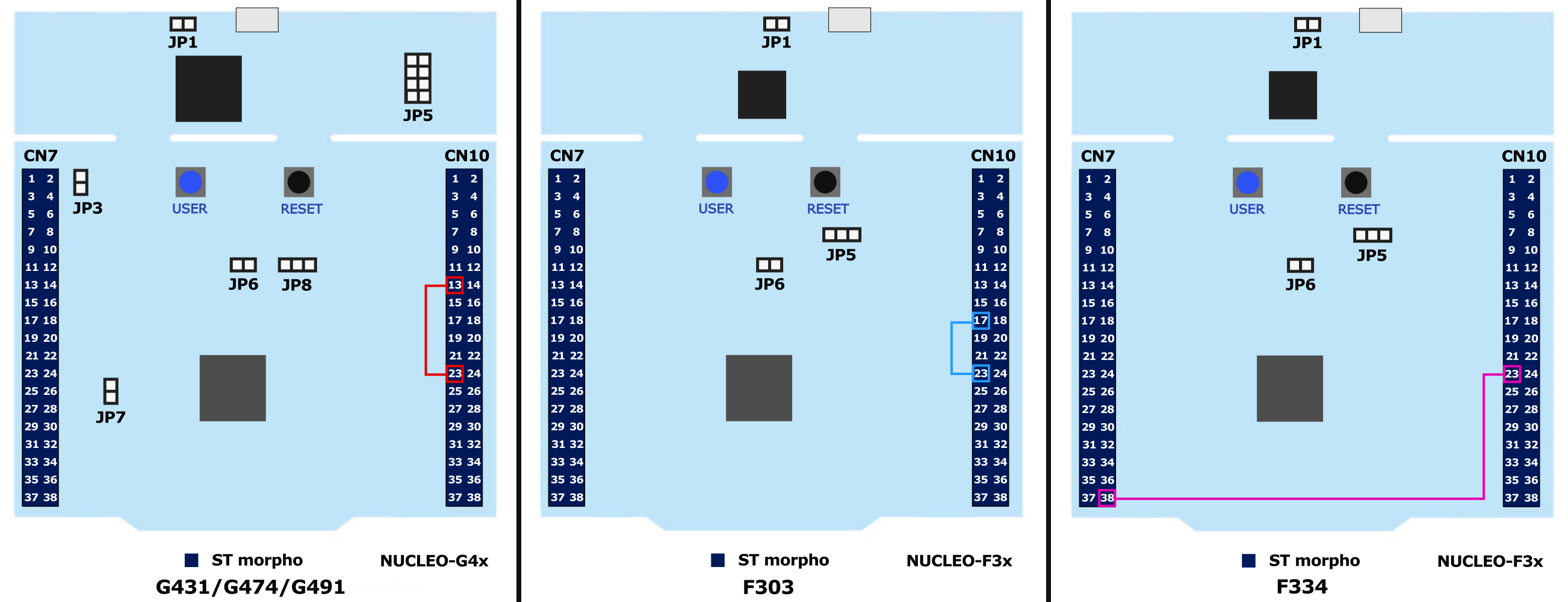
Fig. 5 Jumper wire connection to measure variable-frequency PWM signals depending on the hardware target
External Mode
Once the generated code is running on the STM32 target and the jumper wire is connected, the user can enter the External Mode to update the Display blocks in the PLECS application with real-time values and change certain simulation parameters. The steps below outline how to connect to the target device, with additional debugging details provided in the “Start the External Mode” section of the user manual [6].
First, open the Coder > Coder Options… window, and from the System menu on the left-hand side, select the desired MCU in the “Variable frequency PWM” drop down.
Next, from the External Mode tab, click Connect.
Next, click Activate autotriggering to observe the results in the Display blocks.
Real-time values can now be viewed in the Display blocks found within the subsystem of the selected MCU.
Parameter Inlining
Certain values on the target device can be changed in real-time, if the component is added to the “Exceptions” list found in the Parameter Inlining tab of the Coder > Coder Options… window, prior to building the model. In this case, the Constant values labeled “\(f'\)” and “duty” can be changed when connected to the target device via the External Mode. Changes in the parameters will be reflected in the Display block values once they take effect.
Phase-Shifted PWM Signal Generation
Generating phase-shifted PWM signals is only supported on targets that feature the HRTIM peripheral. Two target-specific subsystems are placed in the “Variable phase PWM” subsystem. One is configured for the “G474RE” MCU and the other for the “F334R8” target.
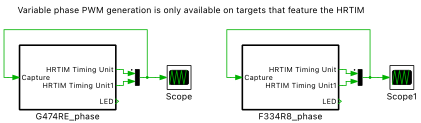
Fig. 6 Top level schematic of the phase-shifted PWM signal generation setup
HRTIM setup
Phase-shifted PWM signals can be generated based on the HRTIM target blocks. A typical setup is shown in Fig. 7. The hrtim_timing_unit_stm32 have to be synchronized to a hrtim_master_stm32. The first timing unit has a zero phase-shift in respect to the Master timer. The second timing unit has a variable phase-shift that can be changed based on the “phB” value. In addition, each timing unit can have an individual duty cycle value.
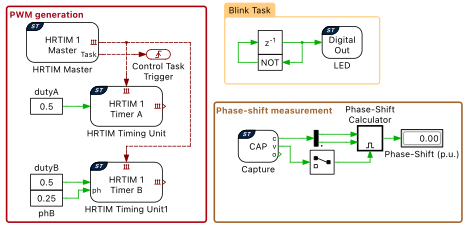
Fig. 7 Setup to generate phase-shifted PWM signals
PWM Capture
A capture_stm32 is configured to evaluate the phase-shift between the two generated PWM signals. Two channels of the Capture unit are activated to react to the rising edge of the connected signals. Each time a rising edge occurs the counter value is latched, as shown in Fig. 8. The difference between two samples of the same signal (\(c_{\rm period}\)) is an estimate of the PWM period. The counter difference between the two signals (\(c_{\rm ph}\)) is a measure for the phase-shift between the signals. The phase-shift in per unit can be calculated as \(ph = c_{\rm ph} / c_{\rm period}\).
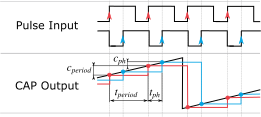
Fig. 8 Configuration of the Capture target block
Simulation
Each subsystem can be directly converted into target specific code for the corresponding STM32 hardware.
Flash the MCU
Follow the instructions below to upload one of the subsystems to an STM32 MCU.
Connect the desired MCU to the host computer through a USB cable.
Open the Coder > Coder Options… window, and from the System menu on the left-hand side, select the MCU of interest.
To deploy the MCU target directly from PLECS click Build.
If programmed correctly, the green LED (LD2) on the STM32 board should blink.
Connect the hardware
Next, connect the pins listed below using jumper wires for the desired MCU, according the Fig. 9
G474RE: Connect PA8 (CN10-23) to PA6 (CN10-13); PA7 (CN10-15) to PA10 (CN10-33)
F334R8: Connect PA8 (CN10-23) to PA6 (CN10-13); PA7 (CN10-15) to PA10 (CN10-33)
This connection will feedback the two PWM signals to the Capture unit to evaluate the phase-shift of the two signals.
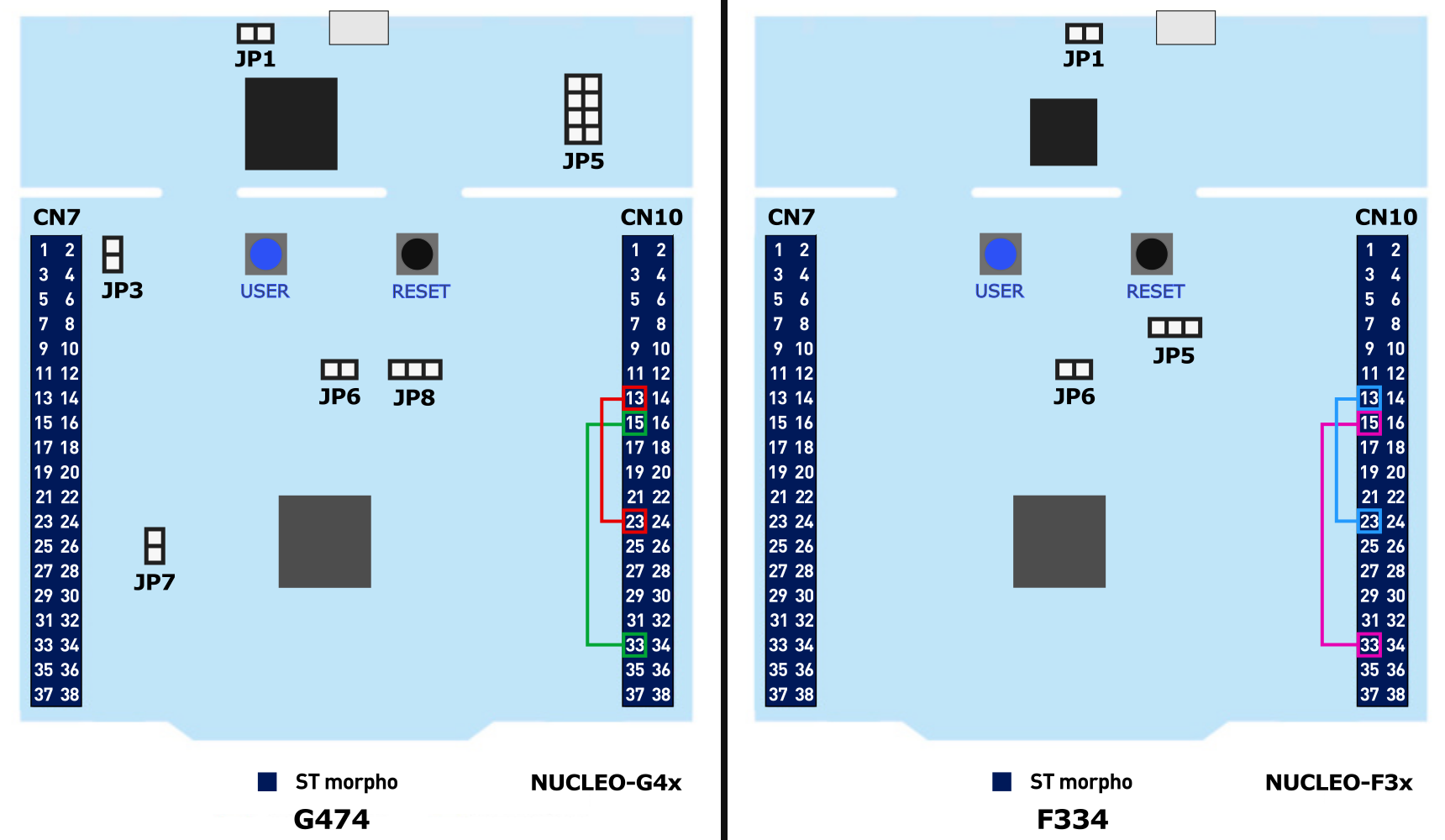
Fig. 9 Jumper wires connection to estimate the phase-shift between two signals
External Mode
Once the generated code is running on the STM32 target, the user can enter the External Mode to update the Display blocks in the PLECS application with real-time values and change certain simulation parameters. The steps below outline how to connect to the target device, with additional debugging details provided in the “Start the External Mode” section of the user manual [6].
First, open the Coder > Coder Options… window, and from the System menu on the left-hand side, select the desired MCU in the “Variable phase PWM” drop down.
Next, from the External Mode tab, click Connect.
Next, click Activate autotriggering to observe the results in the Display blocks.
Real-time values can now be viewed in the Display blocks found within the subsystem of the selected MCU.
Parameter Inlining
Certain values on the target device can be changed in real-time, if the component is added to the “Exceptions” list found in the Parameter Inlining tab of the Coder > Coder Options… window, prior to building the model. In this case, the Constant values labeled “phB”, “dutyA” and “dutyB” can be changed when connected to the target device via the External Mode. Changes in the “phB” parameter will be reflected in the Display block value once they take effect.
Conclusion
This model demonstrated typical configurations to generate advanced PWM signals on STM32 microcontrollers. Frequency-variable PWM signals can be generated either by using the standard PWM block or the HRTIM blocks from the STM32 Target component library. Phase-shifted PWM signals can only be generated on targets that feature the HRTIM peripheral.
The Capture target block allows extracting duty cycle and period information of a PWM signal. It also allows quantifying the phase-shift between two PWM signals.
Bibliography
[1]
NUCLEO-G431RB, URL: https://www.st.com/en/evaluation-tools/nucleo-g431rb.
[2]
NUCLEO-G474RE, URL: https://www.st.com/en/evaluation-tools/nucleo-g474re.
[3]
NUCLEO-G491RE, URL: https://www.st.com/en/evaluation-tools/nucleo-g491re.
[4]
NUCLEO-F303RE, URL: https://www.st.com/en/evaluation-tools/nucleo-f303re.
[5]
NUCLEO-F334R8, URL: https://www.st.com/en/evaluation-tools/nucleo-f334r8.
[6]
STM32 Target Support Online Help: Quick Start.