RGB LED Peak Current Control
Overview
This demo model features the high-brightness RGB LED control application as defined in the application note AN5345 from STMicroelectronics [1], using the B-G474E-DPOW1 Discovery kit [2].
The power circuit consists of three inverted buck converters driving an RGB LED module. The RGB LED module is composed of three independent LEDs: red, green and blue. These LEDs are then independently controlled using a peak current control approach with burst mode operation for independent control of brightness and color. The STM32 Target Support Library includes a pcc_stm32. The component integrates several MCU peripherals including a high-resolution timer, comparator, and a digital-to-analog converter to achieve the desired PCC functionality. The joystick buttons on the B-G474E-DPOW1 Discovery kit are used to enable the PCC output and configure the control logic operation. Signal LEDs display the controller’s operating status.
The following sections provide a brief description of the model and instructions on how to simulate the model, and deploy the control code to the STM32 target.
Model
The top-level schematic contains the power circuit and the controller, as shown in Fig. 1. The “Controller” subsystem is enabled for code generation from the Edit > Subsystem > Execution Settings… menu. This step is necessary to generate the model code for a subsystem via the PLECS Coder.
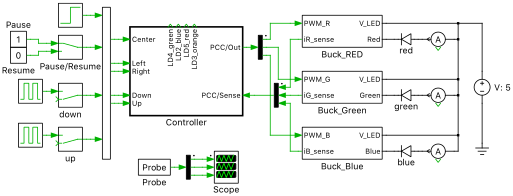
Fig. 1 Top-level schematic of the model
Power Circuit
The power circuit comprises of three inverted buck converters driving a high brightness RGB LED. The RGB LED is composed of three independent LEDs: red, green and blue. Fig. 2 shows the red LED buck converter topology. The green and blue LED buck converters are identical to the red LED buck converter topology.
The LED load is represented by a non-linear V-I curve obtained by measuring the values of forward current and forward voltage of the RGB LED of the B-G474E-DPOW1 Discovery kit [2] using an oscilloscope. Right-click the LEDs and select Subsystem > Look Under Mask to see the non-linear LED implementation.
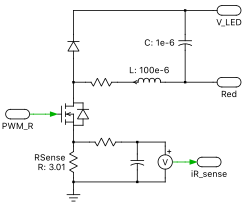
Fig. 2 Red LED buck converter
Current Sensing
Each LED’s current is sensed via a sense resistor “RSense”, connected to the MOSFET source pin, as shown Fig. 2. This sense resistor voltage is then fed back to the controller.
Controls
A detailed view of the “Controller” subsystem is shown in Fig. 3. The pcc_stm32 is responsible for current regulation. The “Mode_select” subsystem allows the user to choose between different control modes for the RGB LED module. The B-G474E-DPOW1 Discovery kit’s joystick inputs are read as digital input signals that are used to start and stop mode cycling, set the global brightness level, and enable the PWM outputs. Four signal LEDs are used as indicators displaying the mode of operation.
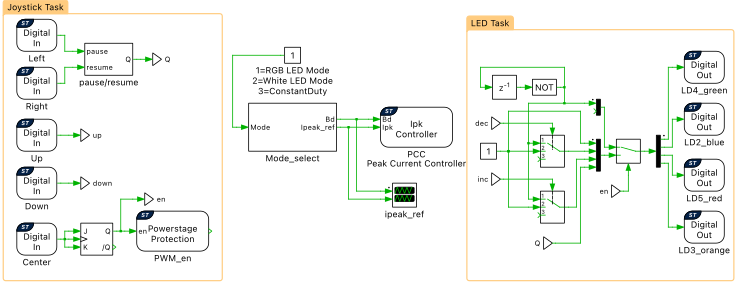
Fig. 3 Controller subsystem
Peak current controller
In a peak current-mode controller, at the beginning of each switching cycle the output is set (gate signal is turned ON) without a pre-determined duty cycle. Then, when the sensed inductor current exceeds the peak current reference value, the output is reset (gate signal is turned OFF). The duty cycle is therefore determined by the rise of the inductor current during the on-time.
One of the drawbacks of the peak current-mode controller is that it suffers from an inherent instability if the applied PWM duty cycle is greater than \(50\,\%\). This is explained in Fig. 4. If a small disturbance is introduced into the system and if the applied duty cycle is less than \(50\,\%\), the disturbance eventually decays to zero. However, if the applied duty cycle is greater than \(50\,\%\), the inductor current will start to diverge and will no longer be stable. The resulting duty cycle values will vary from small to large, on an alternating cycle basis, called sub-harmonic oscillations. To limit these sub-harmonic oscillations, instead of providing a constant peak current reference, additional slope compensation is applied, as shown in Fig. 4. This ensures the stability of the inductor current [3][4].
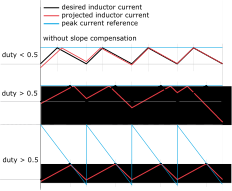
Fig. 4 Slope compensation
Brightness and color control
The project is configured so that both brightness and color are independently controllable.
The global brightness function of each LED is performed at constant current, using peak current-mode control. For a given color mix, dimming is achieved by burst mode operation, where pulses of peak current are alternated with periods of zero current (by turning the MOSFET OFF), as shown in Fig. 5. To prevent any flickering effect that the human eye may detect, the burst mode frequency is set to \(400\,\mathrm{Hz}\). The LED brightness is adjusted proportionally to the peak current period relative to the zero current period.
The color mixing is defined by the peak current threshold for each LED. For the RGB output to be red, the current of the red LED will be at a maximum and all other LED currents will be zero. The RGB output will be different shades when the current thresholds of each LED are at different values. For example, a purple color will be visible with equal red and blue LED peak current threshold, and zero current in the green LED.
The PWM generation and peak current-mode control is handled by the pcc_stm32 of the STM32 target library. The high-resolution timer (HRTIM) of the peak current controller is set to generate a PWM frequency of \(250\,\mathrm{kHz}\). Refer to the section Peak current controller for a detailed description of the PCC operation.
Peak current reference \(i_\mathrm{peak\_ref}\) is provided as an input to the PCC block. The peak current reference is a function of two parameters, the burst duty ratio \(Bd\) and the peak current threshold \(i_\mathrm{peak\_threshold}\). The duty ratio \(Bd\) of the peak current reference defines the global brightness of all LEDs and is modulated at \(400\,\mathrm{Hz}\), the burst mode frequency. The higher the duty ratio, the brighter the LED. The peak current threshold \(i_\mathrm{peak\_threshold}\) specifies the peak current and relative brightness for each LED.
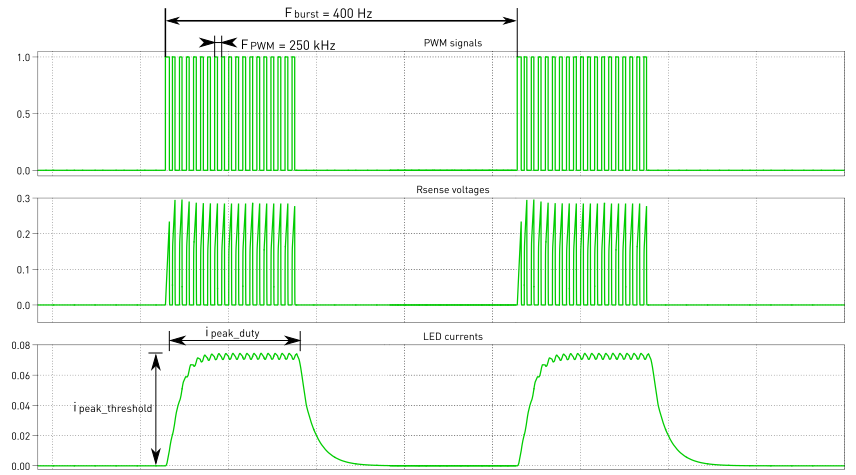
Fig. 5 LED peak current-mode control with burst operation
Operating modes
In this model, the LED can be driven in three modes. The user can switch between the modes as seen in Fig. 6.
RGB LED mode: This mode scans the entire color spectrum.
White LED mode: This mode scans the entire white-brightness range. The same RGB LED is used, but red, green and blue colors are mixed to obtain white.
Constant duty mode: In this mode the RGB LED delivers constant color and brightness.
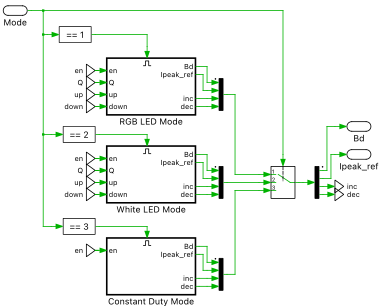
Fig. 6 Mode Select
RGB LED mode
The control logic for RGB LED mode is shown in Fig. 7. This mode scans the entire RGB color spectrum, by independently adjusting the current threshold \(i_\mathrm{peak\_threshold}\) of the peak current reference for each of the red, blue and green LEDs, as shown in Fig. 8. A triangular RGB pattern, is set as the current threshold, where only two LEDs are enabled at a time. To generate this triangular pattern in PLECS, a State Machine block is used. The RGB spectrum scan also includes logic to pause or resume the color spectrum scan.
The global brightness, which is set by the duty ratio \(Bd\) of the peak current reference, remains constant at any time. However, there is an option to manually increase or decrease the global brightness of the LED, using the up and down buttons on the joystick. This will change the applied burst mode duty cycle of the pcc_stm32.
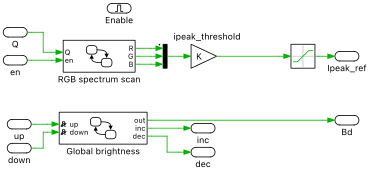
Fig. 7 Control logic for RGB LED mode
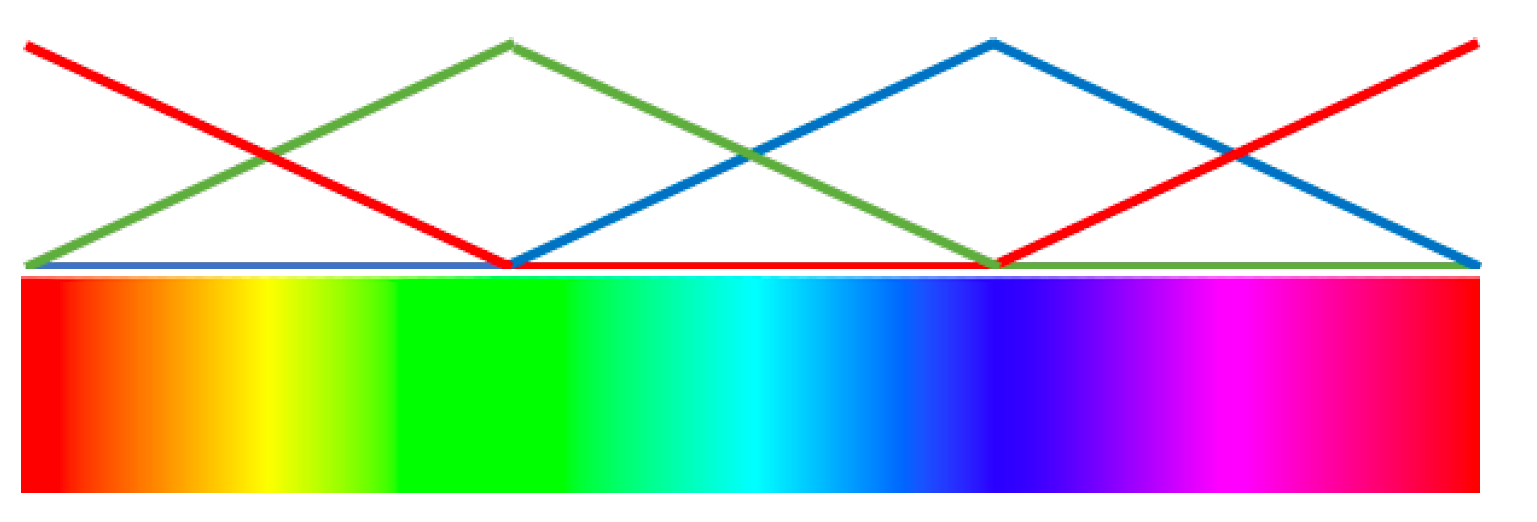
Fig. 8 \(i_\mathrm{peak\_threshold}\) R, G, B pattern for color spectrum scan [1]
White LED mode
The control logic for white LED mode is shown in Fig. 9. This mode corresponds to an automatic dimming of the entire white brightness range. All three RBG LEDs are simultaneously enabled to obtain a white color. In this mode, the duty ratio \(Bd\) of the peak current reference is adjusted using a triangular wave for a pulsating change in brightness. All the three LEDs are enabled using the same \(Bd\), as shown in Fig. 10.
At low brightness levels, with \(Bd\) values below \(0.25\), the current threshold \(i_\mathrm{peak\_threshold}\) value is adjusted as well. This allows lower amounts of global light energy during the start of the LED ON sequence, thereby dimming the LED much more efficiently. For higher brightness, with \(Bd\) values above \(0.25\), the \(i_\mathrm{peak\_threshold}\) is set at the maximum value.
Similar to the RGB LED mode, the white mode also includes logic to automatically pause or resume the white brightness spectrum scan, and to increase or decrease the global brightness of the LED, using the joystick.
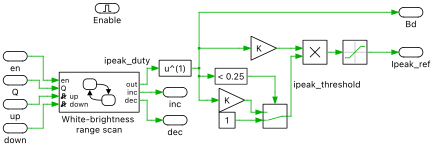
Fig. 9 Control logic for white LED mode
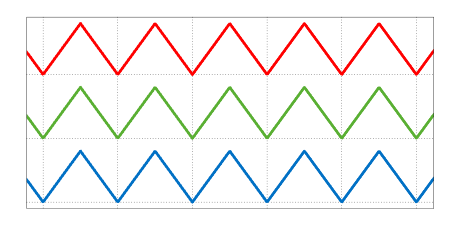
Fig. 10 \(Bd\) R, G, B pattern for white-brightness range scan
Configuring STM32 Target library components
The controller in Fig. 3 contains components from the STM32 Target library.
Peak Current Controller: The main STM32 target component used in the model is the pcc_stm32. This component implements peak current control with slope compensation.
Internally, the PCC block makes use of multiple MCU peripherals, as shown in Fig. 11. The first component is a DAC that provides a peak current set-point including ramp \(i_\mathrm{peak\_ramp}\), for controlling the inductor current. The second is a comparator (COMP); the current sensed via “RSense” in Fig. 2 is fed to the comparator, which is then compared to the \(i_\mathrm{peak\_ramp}\) provided by the DAC. The output of the COMP block is fed to the third component, which is the high-resolution timer (HRTIM). The HRTIM generates the PWM waveforms at a frequency of \(250\,\mathrm{kHz}\) and synchronizes the DAC a the specified frequency. The burst mode control is also handled by the HRTIM. Fig. 12 shows these peak current-mode waveforms.
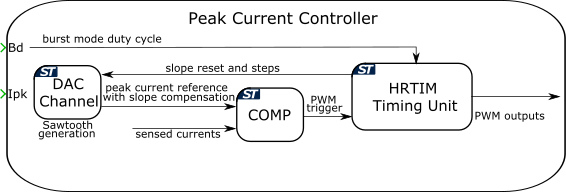
Fig. 11 Peak current controller schematic
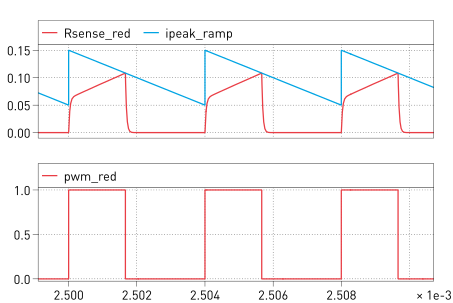
Fig. 12 Peak current-mode waveforms
To prevent the turn-on transient currents from triggering the peak current controller, leading edge blanking time is applied. Fig. 13 shows the measured \(R_\mathrm{sense\_red}\) current using an oscilloscope, with \(i_\mathrm{peak\_ref}\) set to \(0.05\). We can observe that the turn-on transient peak current is larger than the final inductor peak. When leading edge blanking time is applied, this first turn-on transient peak is ignored, and the duty cycle will continue to increase until the sensed inductor current exceeds the desired peak current reference value. From Fig. 13, the required leading edge blanking time is measured to be \(2\mathrm{e}{-7}\,\mathrm{s}\).
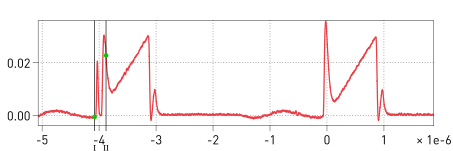
Fig. 13 Measured \(R_\mathrm{sense\_red}\) current
Powerstage Protection: In order to enable or disable PWM signals during runtime, the center push button of the joystick B2 (labeled Center in Fig. 3) is used. The powerstage_protection_stm32 implements a finite state machine to enable or disable all PWM outputs on the target MCU. A logic low to high transition enables the PWM outputs, while a high to low transition disables them.
For more details, browse the Help section of these blocks.
Multi-tasking code
The PLECS Coder and the STM32 Target Support Package allow the user to generate multi-tasking code for the STM32 family of MCUs. Multi-tasking code unlocks processing power for controls regulating multiple system outputs with dynamics on a range of time-scales. In this model multi-tasking code is used since joystick and LED tasks can be executed at a slower rate, compared to the peak current controller.
Multi-tasking code generation is configured in the Scheduling tab of the Coder > Coder Options… window. By changing the Tasking mode to multi-tasking and the Task configuration to specify, the sample time for each task can be configured. The base sample time is always equal to the Discretization step size. The Sample time setting for lower priority tasks must be an integer multiple of the base sample time. Up to 15 slower lower priority tasks that execute at different rates can be specified, preserving processor time for the fastest, highest priority task in the application. For further information, refer to the Code Generation section in the PLECS User Manual [5].
Blocks in the PLECS schematic are assigned to lower priority tasks using the Task Frame library component. In this model two lower priority tasks are defined in addition to the Base Task, as seen in Fig. 3. The table below lists the sample times of the lower priority tasks, with respect to the Base Task. The execution rate of the Base Task \(f_\mathrm{c}\), in this case, is \(20\,\mathrm{kHz}\).
Task name |
Sample time |
|---|---|
Base Task |
\(1/f_\mathrm{c}\) |
Joystick Task |
\(20/f_\mathrm{c}\) |
LED Task |
\(1000/f_\mathrm{c}\) |
Simulation
Offline simulation
Run the model as provided to observe the LED and inductor currents, as well as the PWM waveforms. If desired, the mode can be changed from the \(Mode\) input of the subsystem labeled “Mode_select” in Fig. 3. The LED current waveform of the red LED, with a constant \(Bd\) of \(0.1\), is shown in Fig. 14. The offline model also allows the user to emulate pushing joystick buttons.
Note that the offline simulation may not reveal changing waveforms, as the RGB color scanning and white LED mode brightness operates with long periods on the order of tens of seconds.
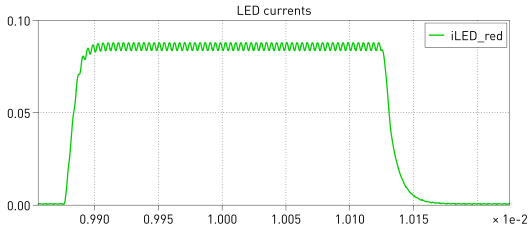
Fig. 14 Current through the red LED with a constant \(Bd\) of 0.1
Embedded target operation
In addition to running a simulation of this demo model in offline mode on a computer, the “Controller” subsystem can be directly converted into target specific code for the STM32G474RE board.
Follow the instructions below to upload the “Controller” subsystem to a STM32 MCU.
Connect the MCU to the host computer through a USB cable.
Open the Coder > Coder Options… window, and in the System menu on the left-hand side, select “Controller”.
Next, from the Target tab, select
STM32G4xfrom the dropdown menu. Then under the General > Chip sub-tab, selectG474RE.To deploy the MCU target directly from PLECS, uncheck the Generate code only parameter, choose the desired Programming interface from the dropdown menu. The default programming interface is
OpenOCD.Then click Build.
Note
If programmed correctly, the green LED labeled “LD4_green” should blink.
For advanced users who are familiar with STM32CubeIDE, there is an option to Generate code only. Locate the appropriate cg folder from the template project (refer to [6] for step-by-step instructions), enter its path into the STM32CubeIDE project directory field and click Build. The code of the “Controller” subsystem will be automatically generated. Then, proceed to build and debug the project as a normal STM32CubeIDE project.
Note
In order to enable PWM signals, push the center button of the joystick. When the PWM signals are enabled, the green LED labeled “LD4_green” turns solid ON.
The RGB LED should now scan the entire RGB color spectrum. It is possible to pause/resume automatic scanning by pressing the left/right joystick keys respectively. When automatic scanning is paused, the orange LED labeled “LD3_orange” should turn ON and when the scanning is resumed again, the LED turns OFF.
To increase/decrease the global RGB LED brightness, press the up/down joystick keys respectively. When increasing the global brightness, the red LED labeled “LD5_red” should turn ON. Then “LD5_red” should start to blink as soon as the brightness upper limit is reached. Similarly, when decreasing the global brightness the blue LED labeled “LD2_blue” should turn ON and when the global brightness lower limit is reached, “LD2_blue” should start blinking.
To switch the mode from RGB LED mode to white LED mode, follow the instructions below to connect to the external mode of the STM32 MCU.
First, open the Coder > Coder Options… window, and from the System menu on the left-hand side, select “Controller”.
Next, from the External Mode tab, select the appropriate Target device and click Connect. The default communication link of the model is set to
Serial over GDB, and the device name configured to127.0.0.1.Optionally, Activate autotriggering to observe the test results in the “Controller” subsystem Scope.
Then, return to the “Controller” schematic, and set the \(Mode\) input to the subsystem labeled “Mode_select” in Fig. 3 to \(2\).
Similar to the RGB LED mode, it is possible to pause/resume automatic scanning or increase/decrease the global brightness of the LED in the white LED mode as well.
Conclusion
This model demonstrates the high-brightness RGB LED control application as defined in the application note AN5345 from STMicroelectronics, using the B-G474E-DPOW1 Discovery kit.
Bibliography
[1]
AN5345 High-brightness RGB LED control using the B-G474E-DPOW1 Discovery kit.
[2]
B-G474E-DPOW1 Discovery kit with STM32G474RE MCU, URL: https://www.st.com/en/evaluation-tools/b-g474e-dpow1.html.
[3]
AN5497 Buck current mode with the B-G474E-DPOW1 Discovery kit.
[4]
NPTEL lectures from Indian Institute of Science, Bangalore. Click to access online: Slope compensation for current control
[5]
[6]
STM32 Target Support Online Help: Quick Start.