Multiphase Buck Converter
Overview
This STM32 demo model features an interleaved buck converter as described in the application note AN4539 from STMicroelectronics [1].
The power circuit consists of a three-phase interleaved buck converter feeding a common load. Changing dynamically the number of interleaved phases, also known as phase shedding, will increase the converter efficiency at light load conditions. In addition, a multiphase buck topology has the advantage of reduced current ripple on the output capacitor.
The following sections provide a brief description of the model and instructions on how to simulate the model, and deploy the control code to the STM32 target.
Note
Requirements
In order to run this model you will need:
The Plant model can be executed on all versions of the RT Box. The controller can be executed on a NUCLEO-G474RE Nucleo board.
Model
The top-level schematic contains the power circuit and the controller, as shown in Fig. 1. Both subsystems are enabled for code generation from the Subsystem > Execution Settings… context menu. This step is necessary to generate the model code for a subsystem via the PLECS Coder.
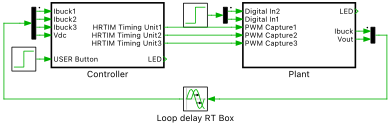
Fig. 1 Top level schematic of the demo model
Plant
The power circuit, as shown in Fig. 2, includes a three-phase interleaved buck converter. The DC-DC converter is supplied by a DC source voltage of \(V_\mathrm{in} = 48\,\mathrm{V}\).
The three pulse-width modulated (PWM) switching signals are obtained from the PWM Capture blocks of the PLECS RT Box library. Further details on the power module components and the sub-cycle averaging of PWM signals are described in [2]. The three phase currents and the output voltage are connected to Analog Out blocks from the PLECS RT Box library. The phase inductances and the belonging series resistances differ by \(\pm 10\,\%\) around their nominal value in each phase. This leads to an uneven current sharing between the individual phases. Uniform current sharing among the active buck converters has to be ensured by means of an appropriate control structure.
The discretization step size of the plant subsystem is set to \(2\,\mathrm{\mu s}\).
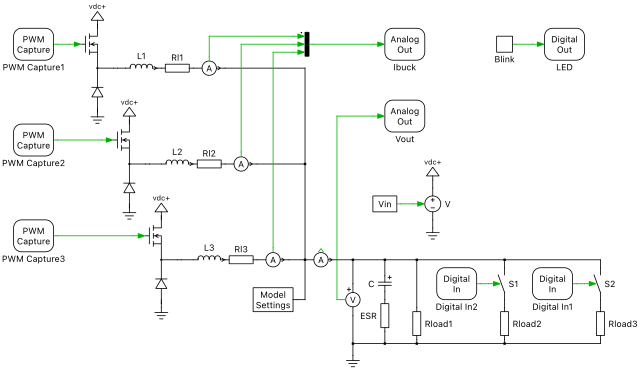
Fig. 2 Power circuit of the multiphase buck converter
The total load resistance can be changed based on the position two Digital In signals. The number of active phases is a function of the total load current. The lower the load resistance, the more phases are active.
Controller
In the controller subsystem, shown in Fig. 3, the individual phase currents are measured by adc_trigger_stm32 from the STM32 Target component library. They represent injected conversions and the sampling point is placed in the middle of the on-time of each PWM phase. This ensures sampling the phase currents almost free of ripple. The start-of-conversion trigger is emitted by the three hrtim_timing_unit_stm32.
The DC output voltage is sampled by a regular adc_stm32.
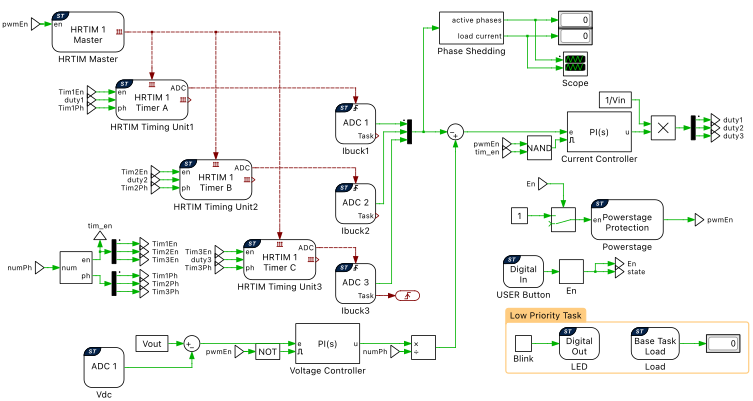
Fig. 3 Controller subsystem
Three HRTIM timing units are synchronized to a hrtim_master_stm32. This configuration allows to generate phase-shifted PWM signals. The phase-shifting is handled by the master timer. The applied relative phase-shift \(\Theta_\mathrm{ph}\) changes in function of the number of active phases and is given as:
The master timer is running in continuous mode and resets the synchronized timing units periodically. The three reset signals for the timing units are generated by three internal compare registers of the master timer. The value of each compare register is calculated to generate the requested phase-shift. However, the duty cycle is handled by each of the three timing units locally.
This is also illustrated in Fig. 4. In addition, the sampling points are indicated by colored flashes. For a sawtooth carrier, the sampling point instant has to be adjusted every time the duty cycle changes. For phase three, the resulting inductor current is sketched. As illustrated, the sampling point represents the average current.
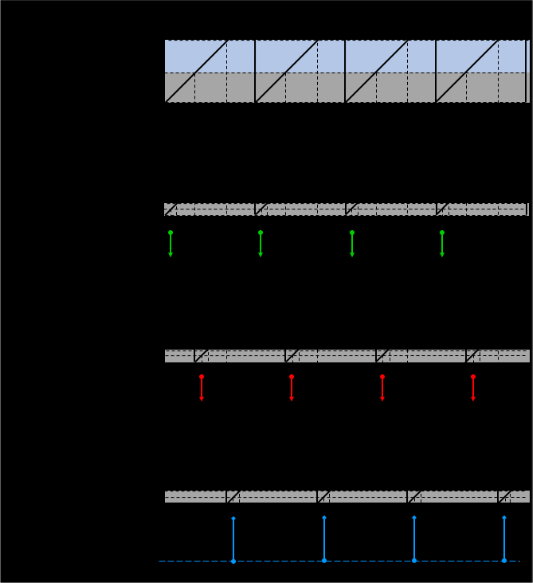
Fig. 4 Interleaved PWM generation for three active phases. The colored flashes are indicating the sampling points of the three phases.
The number of active phases are computed based on the total load current. The total load current is estimated as the sum of the individual currents of the active phases. Due to small loop delays, the sampling point no longer lies in the middle of the on-time of the PWM signal. This leads to a wrong average current values. The estimated sampling error is compensated by software. The following equations describe the compensation:
\(i_x^*\) describes the compensated phase current and \(i_\mathrm{x}\) is representing the sampled phase current. \(V_\mathrm{in}\) and \(V_\mathrm{out}\) are the input and output voltage of the converter, \(L\) describes the nominal phase inductor value. \(T_\mathrm{delay}\) is the measured loop delay and \(T_\mathrm{on}\) is the duration of the PWM on-time in seconds \((\mathrm{s})\).
The number of active phases are adjusted dynamically, depending on the load current. Every time the number of active phases changes, the phase-shift of the remaining phases needs to be rearranged.
The converter is controlled by nested voltage and current control loops. One single outer voltage loop ensures tight regulation of the load voltage. The voltage controller provides the current setpoint of the three inner current control loops. Each interleaved phase has its own current controller. Individual current control loops will ensure equal current sharing among the active phases. The current control loops provide the compare value between \(0\) and \(1\) to the HRTIM timing unit.
An estimate of the used processor resources can be obtained from the base_task_stm32 from the STM32 component library. The value represents the duration of the base task relative to the configured Discretization step size in the Coder > Coder Options… window, in percent.
The blinking LED (LD2) indicates a running firmware on the MCU.
Simulation
Offline simulation
Run the model as provided from Simulation > Start, to observe the results from the offline simulation. Fig. 5 shows the results from the Scope in the “Plant” subsystem.
At \(0.001\,\mathrm{s}\), the USER button is pressed and the controller enabled. First, only a relative light load condition is simulated. Therefore, only one phase is active. At time \(0.1\,\mathrm{s}\) the load is increased. This activates the second buck converter. Finally, at \(0.2\,\mathrm{s}\) the load is increased once again. At this operating point all three converters work in parallel and participate equally to the total load current.
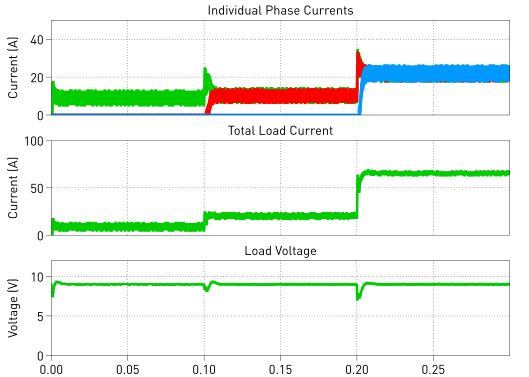
Fig. 5 Offline simulation result of increasing load steps
Configuring the STM32 Target
In addition to running a simulation of this demo model in offline mode on a computer, the “Controller” subsystem can be directly converted into target specific code for the STM32G474RE NUCLEO board.
Follow the instructions below to upload the “Controller” subsystem to a STM32 MCU.
Connect the MCU to the host computer through a USB cable.
Open the Coder > Coder Options… window, and in the System menu on the left-hand side, select “Controller”.
Next, from the Target tab, select
STM32G4xfrom the dropdown menu. Then under the General sub-tab, select the chipG474RE.To deploy the MCU target directly from PLECS, uncheck the Generate code only parameter, choose the desired Programming interface from the dropdown menu. The default programming interface is
OpenOCD.Then click Build.
If programmed correctly, the green LED “LD2” on the NUCLEO board should blink.
Note
Verify the jumper configuration on the NUCLEO board: JP5 not populated, JP8 in position [2–3], JP6 closed.
Configuring the PLECS RT Box
Prior to controlling a real power stage with the programmed MCU, it is highly recommended to first verify the behavior of the controller using a PLECS RT Box and perform a HIL test. A typical hardware configuration is shown in Fig. 6, where the NUCLEO board (the light blue board) is connected to the RT Box via an RT Box NUCLEO Interface board (the green board).
Follow the instructions below to run a real-time model on the RT Box. The “Plant” subsystem is executable on all RT Box platforms.
Open the Coder > Coder Options… window, and in the System menu on the left-hand side, select “Plant”. Click the Target tab and select a target device. Then click Build to deploy the model to the target RT Box.
Once the model is uploaded, from the External Mode tab, Connect to the RT Box and Activate autotriggering to observe the test results in real time.
If programmed correctly, the LED corresponding to “DO-31” of the RT Box NUCLEO Interface board should blink.
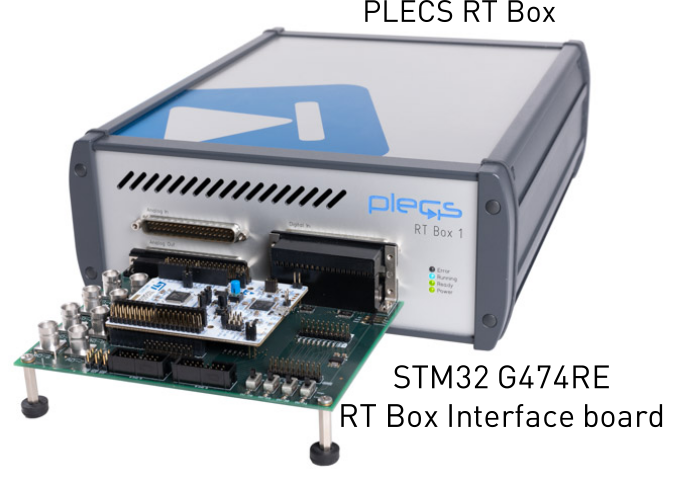
Fig. 6 Hardware setup for the HIL verification
Executing a Closed-Loop HIL Test
Enable the MCU by pushing the blue “User” push-button on the NUCLEO board. This initiates the PWM signal generation. Observe the real-time waveforms in the Scope of the “Plant” subsystem.
Toggling the switches “DI-28” and “DI-29” on the RT Box LaunchPad Interface board from low to high will increase the load of the converter.
To observe any intermediate values calculated on the MCU, follow the instructions below to connect to the external mode of the STM32 MCU.
First, open the Coder > Coder Options… window, and Disconnect the “Plant” subsystem from the External Mode of the PLECS RT Box, if connected.
From the System menu on the left-hand side, select “Controller”.
Next, from the External Mode tab, select the appropriate Target device and click Connect.
Then, Activate autotriggering to observe the test results in the “Controller” subsystem Scope.
Then, connect to the external mode of the RT Box again following the instructions provided in Configuring the PLECS RT Box.
To stop the operation of the multiphase converter, push the blue “User” push-button on the NUCLEO board once again. This will stop the PWM signal generation and the controller will enter an idle state, waiting for the next push on the “User” push-button.
Conclusion
This models demonstrated how to use the HRTIM Master and HRTIM timing unit blocks to generate PWM signals for a multiphase buck converter with load shedding. The model can be run in both offline mode, as well as in real time.
Bibliography
[1]
AN4539, HRTIM cookbook, 2020, Chapter: 7
[2]
J. Allmeling, and N. Felderer, “Sub cycle average models with integrated diodes for real-time simulation of power converters,” IEEE Southern Power Electronics Conference (SPEC), 2017.