Sensorless Field-Oriented Control of PMSM
Overview
This STM32 demo model features a drive system with a three-phase brushless DC motor (BLDC), with sinusoidal back-emf. The following sections describe the implementation of the power stage and controls in detail. Below are the highlights of this demo model.
It provides an explanation of the typical workflow of the PLECS Coder for embedded targets, using an STM32G4x or STM32F3x microcontroller (MCU) from STMicroelectronics.
Shows the implementation of a rotor position and speed observer for sensorless field oriented control (FOC) strategy.
Implements a closed-loop cascaded controller with inner d and q axis current controller and outer speed controller.
The model is split into two distinct subsystems called “Plant” and “Controller”. This allows the same model to be used for –
Offline simulation in PLECS
Hardware-in-the-loop (HIL) testing with the PLECS RT Box
Rapid control prototyping (RCP) with the P-NUCLEO-IHM03 motor control pack from STMicroelectronics [3].
The following sections provide a description of the model and instructions on how to simulate the model, and deploy the control code to the STM32 target.
Requirements
In order to run this model you will need:
For RCP:
For HIL:
The Plant model can be executed on all versions of the RT Box. Alternatively, the controller can also be executed on a NUCLEO-G474RE or a NUCLEO-F303RE board.
Note
Model
The top level schematic contains two separate subsystems representing the controller and the plant models, as shown in Fig. 1. Both subsystems are enabled for code generation from the Subsystem > Execution Settings… context menu. This step is necessary to generate the model code for a subsystem via the PLECS Coder.
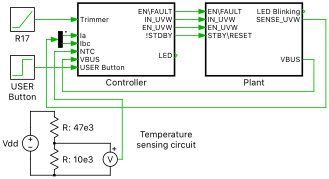
Fig. 1 Top level schematic of the demo model
Plant
The power circuit, as shown in Fig. 2, includes a permanent magnet synchronous machine (PMSM) and a three-phase full bridge voltage source inverter (VSI), and is supplied by a DC source voltage (\(V_{\mathrm{i}}\)) of \(V_{\mathrm{dc}} = 12\,\mathrm{V}\). The VSI is composed of three MOSFET Half Bridge power module components.
The subsystem labeled “STSPIN830” models a basic functionality of the STSPIN830 three-phase motor driver [4].
The six pulse-width modulated (PWM) switching signals are obtained from the PWM Capture block of the PLECS RT Box library. Further details on the power module components and the sub-cycle averaging of PWM signals are described in [6]. The DC input voltage and the AC output stator current measurements are connected to Analog Out blocks from the PLECS RT Box library. The discretization step size of the plant subsystem is set to \(3\,\mathrm{\mu s}\).
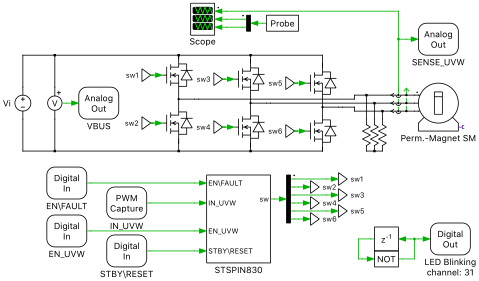
Fig. 2 Power circuit of the PMSM drive system
Machine Parameters
The machine parameters are listed in the table below, which were taken partly from the data estimated on the real hardware by using the motor profiler software provided by STMicroelectronics [5].
Number of pole pairs |
\(7\) |
Maximum Torque \((\mathrm{Nm})\) |
\(0.981\) |
Maximum Speed \((\mathrm{rpm})\) |
\(2180\) |
Stator Resistance \((\Omega)\) |
\(4.7\) |
Stator Inductance \((\mathrm{mH})\) |
\(0.96\) |
Inertia (\(\mathrm{nNms}^2\)) |
\(497\) |
Friction \((\mathrm{nNms})\) |
\(755\) |
Back EMF Voltage \((\mathrm{V/krpm})\) |
\(4.85\) |
Controller
In the controller subsystem, shown in Fig. 3, the three stator currents are measured by adc_trigger_stm32 from the STM32 Target component library. They represent injected conversions and the start of conversion is triggered by an external event, in this case a PWM underflow event. The DC-Bus voltage is monitored by using a regular ADC channel. A regular ADC channel is continuously converted in the background without any intervention of the CPU. The same type of ADC is used to sense the temperature on the PCB and the speed reference provided by the trimmer R17 mounted on the X-NUCLEO-IHM16M1 board.
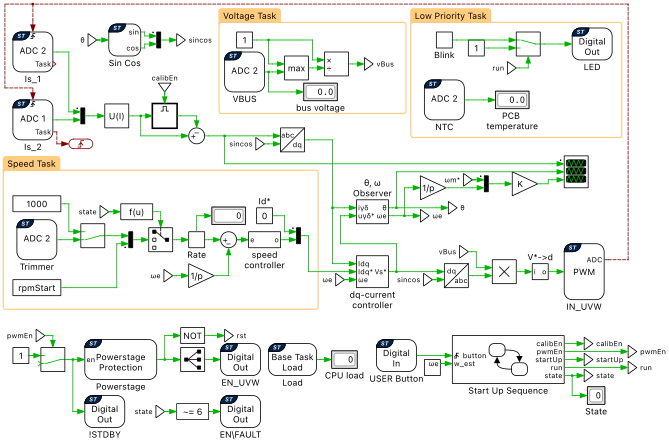
Fig. 3 Controller model of the sensorless rotor-field oriented control
Rotor-field oriented control is applied to the drive system and the basic structure is shown in Fig. 3. The stator currents are regulated in the dq rotating frame. The speed and rotor position are calculated by the subsystem labeled “Observer”. An outer control loop, which is a speed controller, is implemented, where a speed reference in RPM \((\mathrm{rpm})\) is manually set either via a Constant block, or via the trimmer R17 on the X-NUCLEO-IHM16M1 board. The speed reference via the trimmer can be varied between \(200\) and \(1500\,\mathrm{rpm}\). Rotating the trimmer in a clockwise direction decreases the speed reference.
Note
The complete controller can be enabled or disabled via the blue “User” push-button on the NUCLEO board.
Voltage control variables in the dq rotating frame are derived from Eq. (1), when \(L_{\mathrm{sd}} = L_{\mathrm{sq}}\).
PI current controller
The d and q axis currents are controlled by two separate PI controllers, and are included in the subsystem labeled “dq-current controller”, shown in Fig. 4. The proportional and integral gains are designed to achieve a given bandwidth and phase-margin.
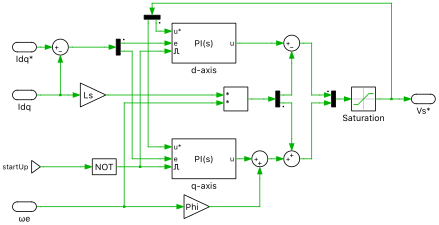
Fig. 4 PI controller in dq frame
Rotor position and speed observer
The subsystem labeled “Observer” is shown in Fig. 5. This is developed according to [1], and is conceptually explained below. This observer can be utilized by any type of synchronous motor such as a surface PMSM (non-salient \(L_{\mathrm{d}} = L_{\mathrm{q}}\)), interior PMSM (with saliency \(L_{\mathrm{d}} < L_{\mathrm{q}}\)) and synchronous reluctance motor.
In the observer model as seen in Fig. 5, the estimated rotating \(\gamma\)\(\delta\) frame is used, which differs from the dq reference frame with respect to the position error \(\theta_{\mathrm{e}}\). The position error \(\theta_{\mathrm{e}}\) is obtained from the extended electromotive force (EMF), estimated by the observer. This position error \(\theta_{\mathrm{e}}\) is used to estimate the rotor position and speed.
Fig. 6 shows the conceptual block diagram of the least-order observer for estimating \(e_{\mathrm{\gamma}}\); \(g\) is the observer gain, and is set to \(600\). The \(\delta\)-axis component of \(e_{\mathrm{\delta}}\) is estimated in the same way as \(e_{\mathrm{\gamma}}\). The blue dotted frame in Fig. 6 outlines how the observer is embedded in the overall model.
All integrators in the observer can be reset by a reset signal.
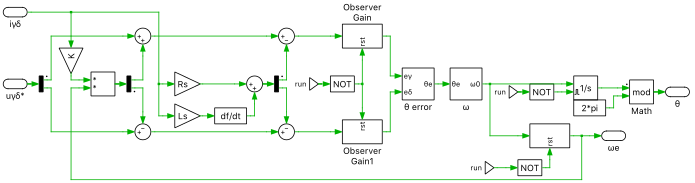
Fig. 5 Schematic of the rotor position and the speed observer
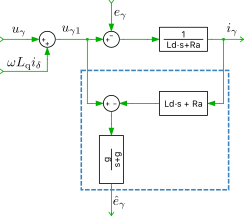
Fig. 6 Equivalent block diagram of the least-order observer
Speed Control
An outer speed control loop controls the drive speed. The time constants of the outer control loop is dictated by the mechanical time constant, which is larger in comparison to the inner current control loop.
The proportional-integral speed controller can be described by Eq. (2).
where, \(T_{\mathrm{e}^* }\) is the reference torque, \(\Delta\omega_{\mathrm{m}} = \omega_{\mathrm{m}}^* - \omega_{\mathrm{m}}\), \(K_\mathrm{p}\) is the proportional gain and \(K_\mathrm{i}\) is the integral gain.
The manipulated variable of the speed controller, which is the reference torque, \(T_{\mathrm{e}}^*\), is the setpoint for the inner current controller loop. Therefore, a conversion from mechanical torque, \(T_{\mathrm{e}}^*\), to current setpoint, \(i_{\mathrm{q}}^*\), is done using Eq. (3).
where, \(\Psi_{\mathrm{m}}\) is the flux linkage of the permanent magnets and \(p\) is the number of rotor permanent magnet pole pairs.
Multi-tasking code
The PLECS Coder and the STM32 Target Support Package allow the user to generate multi-tasking code for the STM32 family of MCUs. Multi-tasking code unlocks processing power for controls regulating multiple system outputs with dynamics on a range of time-scales. In this model there is a cascaded control scheme with a fast inner current control loop, and a slower outer speed loop. Multi-tasking code is well suited for this type of control scheme.
Multi-tasking code generation is configured in the Scheduling tab of the Coder > Coder Options… window. By changing the Tasking mode to multi-tasking and the Task configuration to specify, the sample time for each task can be configured. The base sample time is always equal to the Discretization step size. The Sample time setting for lower priority tasks must be an integer multiple of the base sample time. Up to 15 slower lower priority tasks that execute at different rates can be specified, preserving processor time for the fastest, highest priority task in the application. For further information, refer to the Code Generation section in the PLECS User Manual [7].
Blocks in the PLECS schematic are assigned to lower priority tasks using the Task Frame library component. In this model three lower priority tasks are defined in addition to the Base Task, as seen in Fig. 3. The table below lists the sample times of the lower priority tasks, with respect to the Base Task. The execution rate of the Base Task is \(10\,\mathrm{kHz}\), which is half the switching frequency (\(f_\mathrm{sw}\)).
Task name |
Sample time |
|---|---|
Base Task |
\(1/f_\mathrm{sw}\) |
Voltage Task |
\(10/f_\mathrm{sw}\) |
Speed Task |
\(20/f_\mathrm{sw}\) |
Low Priority Task |
\(10000/f_\mathrm{sw}\) |
Start-up Sequence
A state-machine is implemented to handle the start-up process of the drive. The state-machine waits in the Idle state, until the blue “User” push-button on the NUCLEO-board is pushed. Once this button is pushed, it triggers the transition to the OffsetCalib, or offset calibration state. In this state, the offset due to the shunt current measurements is calibrated during a fixed period of time. After this calibration time is expired, the start-up is initiated. When the the blue “User” push-button is pushed again for a second time, the state machine goes back to the Idle state and the PWM signals are disabled.
Simulation
PLECS Offline Simulation Results
Run the model as provided from Simulation > Start, to observe the results from the offline simulation. Fig. 7 shows the results from the Scope in the “Controller” subsystem.
At \(0.05\,\mathrm{s}\), the start-up process is initiated. First, the static measurement offset of the current ADC channels is removed. \(0.05\,\mathrm{s}\) the current reference is ramped up. Once the motor position is aligned, the motor starts spinning with a speed reference of \(500\,\mathrm{rpm}\). When the estimated speed reaches this speed reference, the motor starts tracking the final speed reference value of \(1200\,\mathrm{rpm}\) provided by a Constant block. The rate of change of the speed reference is limited to \(2000\,\mathrm{rpm/s}\).
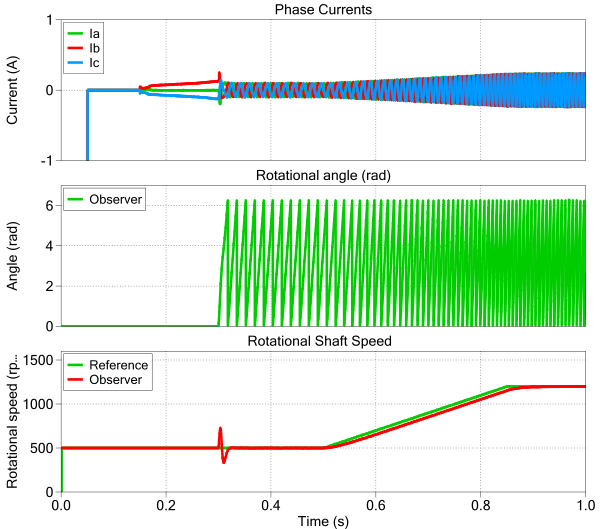
Fig. 7 Offline simulation result of the PMSM starting-up with a speed reference of 500 rpm and ramping up to 1200 rpm at 0.5 s
Configuring the STM32 Target
In addition to running a simulation of this demo model in offline mode on a computer, the “Controller” subsystem can be directly converted into target specific code for the STM32G431RB, STM32G474RE or STM32F303RE NUCLEO board. The model is configured by default for a STM32G431RB NUCELO board, but other targets are supported. Choose the desired Target in the Coder > Coder Options… window. The I/O configuration are automatically adapted according to the selected target. This is accomplished within Simulation > Simulation Parameters… > Initialization > Model initialization commands. Optionally, the “Plant” subsystem can be deployed on the PLECS RT Box to perform a hardware-in-the-loop (HIL) test of the generated code. The controller is also configured to work with the NUCLEO-IHM03 experimental kit offered by ST.
Follow the instructions below to upload the “Controller” subsystem to a STM32 MCU.
Connect the MCU to the host computer through a USB cable.
Open the Coder > Coder Options… window, and in the System menu on the left-hand side, select “Controller”.
Next, from the Target tab, select
STM32G4xorSTMF3xfrom the dropdown menu. Then under the General sub-tab, selectG431RB,G474REorF303RE.To deploy the MCU target directly from PLECS, uncheck the Generate code only parameter, choose the desired Programming interface from the dropdown menu. The default programming interface is
OpenOCD.Then click Build.
If programmed correctly, the green LED “LD2” on the NUCLEO board should blink.
Note
Verify the jumper configuration on the NUCLEO board: JP5 on 5V_STLK, JP8 in position [1–2], JP6 closed.
Configuring the PLECS RT Box
Prior to controlling a real power stage with the programmed MCU, it is highly recommended to first verify the behavior of the controller using a PLECS RT Box and perform a HIL test. A typical hardware configuration is shown in Fig. 8, where the NUCLEO board (the light blue board) is connected to the RT Box via an RT Box NUCLEO Interface board (the green board).
Follow the instructions below to run a real-time model on the RT Box. The “Plant” subsystem is executable on all the RT Box platforms.
Open the Coder > Coder Options… window, and in the System menu on the left-hand side, select “Plant”. Click the Target tab and select a target device. Then click Build to deploy the model to the target RT Box. Since the RT Box pinning depends on the microcontroller, make sure the microcontroller target in the Controller system is selected and saved first before generating the code for the RT Box Plant system.
Once the model is uploaded, from the External Mode tab of the Coder Options dialog, Connect to the RT Box and Activate autotriggering to observe the test results in real time.
If programmed correctly, the LED corresponding to “DO-31” of the RT Box NUCLEO Interface board should blink.
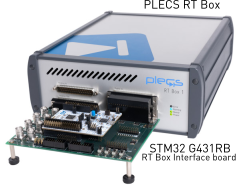
Fig. 8 Hardware setup for the HIL verification
Executing a Closed-Loop HIL Test
Enable the MCU by pushing the blue “User” push-button on the NUCLEO board. This initiates the start-up sequence and PWM signal generation. If the start-up is successful, the speed controller will automatically track the speed reference and the green LED “LD2” on the NUCLEO board turns solid ON. Observe the real-time waveforms in the Scope of the “Plant” subsystem.
Within Simulation > Simulation Parameters… > Initialization > Model initialization commands, change the value of application to “rt_box”.
Make sure that the speed reference source in the “Controller” subsystem is connected to the Constant block. The speed reference value of the Constant block can be changed on the fly, in real-time, since the component has been added to the “Exceptions” list found in the Parameter Inlining tab of the Coder > Coder Options… window, prior to building the model. To observe any intermediate values calculated on the MCU and to change the speed reference in the Constant block, follow the instructions below to connect to the external mode of the STM32 MCU.
First, open the Coder > Coder Options… window, and Disconnect the “Plant” subsystem from the External Mode of the PLECS RT Box, if connected.
In the System menu on the left-hand side, select “Controller”.
Next, from the External Mode tab, select the appropriate Target device and click Connect.
Then, Activate autotriggering to observe the test results in the “Controller” subsystem Scope.
Then, connect to the external mode of the RT Box again following the instructions provided in Configuring the PLECS RT Box.
To stop the motor from spinning, push the blue “User” push-button on the NUCLEO board once again. This will stop the PWM signal generation and the controller will enter an idle state, waiting for the next start-up sequence to be initiated by the user.
Executing a Closed-Loop RCP Test
Finally, the generated control code running on the NUCLEO board can also be used to spin the motor provided with the NUCLEO-IHM03 experimental kit offered by ST.
Within Simulation > Simulation Parameters… > Initialization > Model initialization commands, change the value of application to “rcp”.
Follow the instructions below to setup the hardware to test the generated control code with the NUCLEO motor-control pack.
The X-NUCLEO-IHM16M1 must be stacked on the NUCLEO board through the CN7 and CN10 ST morpho connectors. Mind the direction of placement of the IHM16M1 board. The two buttons on the NUCLEO board must still be accessible.
Connect the three motor wires on the CN1 connector.
Check the jumper settings on the X-NUCLEO-IHM16M1 board: J5 and J6 closed, J2 closed on position [2–3] and J3 closed on position [1–2].
Connect the 12 V DC power supply (use the power supply provided with the pack or an equivalent one) on CN1 or J4.
In the end, your setup should look similar to Fig. 9.
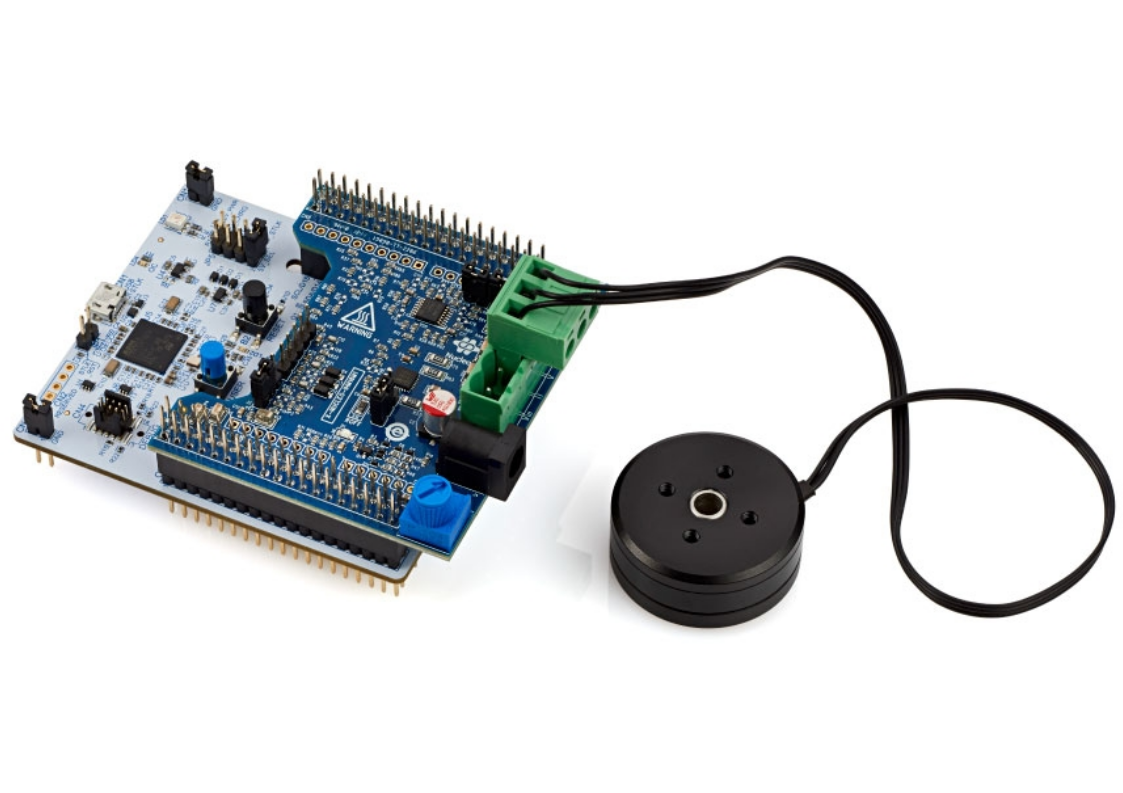
Fig. 9 Hardware setup for the RCP verification
Then program your MCU via the PLECS Coder following the instructions given in Configuring the STM32 Target. If programmed correctly, the green LED “LD2” on the NUCLEO board should blink.
Enable the MCU by pushing the blue “User” push-button on the NUCLEO board. This initiates the start-up sequence and PWM signal generation. If the start-up is successful, the speed controller will automatically track the speed reference and the green LED “LD2” on the NUCLEO board turns solid ON.
To observe any intermediate values calculated on the MCU and to change the speed reference source, follow the instructions below to connect to the external mode of the STM32 MCU.
First, open the Coder > Coder Options… window, and in the System menu on the left-hand side, select “Controller”.
Next, from the External Mode tab, select the appropriate Target device and click Connect.
Then, Activate autotriggering to observe the test results in the “Controller” subsystem Scope.
Rotate the potentiometer on the X-NUCLEO-IHM16M1 board to change the motor speed reference. For this to work, the speed reference source in the “Controller” subsystem must be connected to the ADC “Trimmer” signal.
To stop the motor from spinning, push the blue “User” push-button on the NUCLEO board once again. This will stop the PWM signal generation and the controller will enter an idle state, waiting for the next start-up sequence to be initiated by the user.
Conclusion
This model demonstrated the sensorless FOC control application of a PMSM drive system using the NUCLEO-IHM03 experimental kit. It provided three modes of simulation with step-by-step instructions.
Offline simulation in PLECS
Hardware-in-the-loop (HIL) testing with the PLECS RT Box
Rapid control prototyping (RCP) with the P-NUCLEO-IHM03 motor control pack from STMicroelectronics [3]
Bibliography
[1]
S. Morimoto, K. Kawamoto, M. Sanada and Y. Takeda, “Sensorless control strategy for salient-pole PMSM based on extended EMF in rotating reference frame”, IEEE Trans. Ind. Appl., vol. 38, no. 4, pp. 1054-1061, Jul./Aug. 2002.
[2]
R. De Doncker, D. Pulle and A. Veltman, “Advanced electrical drives”, Springer, 2011.
[3]
Motor Control Nucleo Pack with NUCLEO-G431RB and X-NUCLEO-IHM16M1, URL: https://www.st.com/en/evaluation-tools/p-nucleo-ihm03.html.
[4]
STSPIN830 Compact and versatile three-phase and three-sense BLDC motor driver, URL: https://www.st.com/en/motor-drivers/stspin830.html.
[5]
STM32 Motor Control Software Development Kit (MCSDK), URL: https://www.st.com/en/embedded-software/x-cube-mcsdk.html.
[6]
J. Allmeling, and N. Felderer, “Sub cycle average models with integrated diodes for real-time simulation of power converters,” IEEE Southern Power Electronics Conference (SPEC), 2017.
[7]