Analog Protection Features on STM32 Microcontrollers
Overview
In this STM32 demo model you will learn how to configure analog protection features on STM32 microcontrollers (MCUs) with the PLECS Coder and the STM32 Target Support Package (TSP). Analog protection signals will protect the power switches driven by PWM signals from damage due to over-currents and over-voltages. When a protection signal is triggered by a fault, the PWM outputs are shut down immediately and forced into the pre-defined safe state.
It provides an explanation of the typical workflow of the PLECS Coder for embedded targets, using an STM32G4x, or STM32F3x microcontroller from STMicroelectronics.
Shows a typical configuration to protect the powerstage from over-currents and over-voltages.
Shows how to configure the powerstage_protection_stm32.
Implements a representative offline implementation of the Powerstage Protection and the analog protection signals.
The following sections provide a description of the model and instructions on how to simulate the model, and deploy the control code to the STM32 target.
Requirements
In order to run this model you will need:
One STM32 Nucleo board supported by the PLECS STM32 TSP
Two jumper wires
Note
Model
The top-level schematic, which is shown in Fig. 1, contains four subsystems, one for each supported target of the STM32 TSP. Each subsystem can be independently deployed on the corresponding STM32 hardware. The target specific subsystems are enabled for code generation, as indicated by the thick outer border of the subsystem blocks. This configuration is necessary to generate the model code for a subsystem via the PLECS Coder.
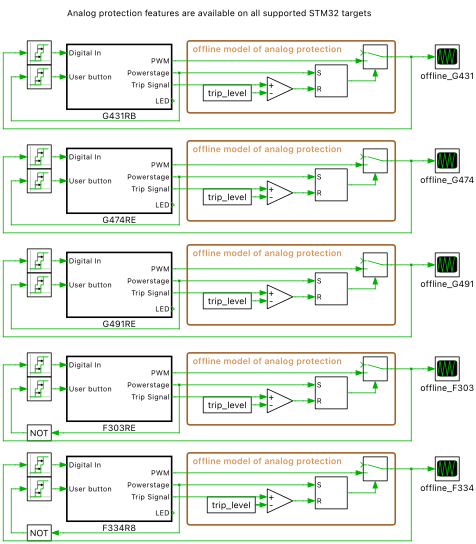
Fig. 1 Top level schematic of the demo model
The generated code runs at a base sample time on the MCU. The sample time is configured by the Sample time setting of the respective task in the Scheduling tab of the Coder > Coder Options… window. In this model, the discretization step size of the base task of each of the subsystems is set to \(100\,\mu\mathrm{s}\). An additional Blink Taks with a sample time of \(0.5\,\mathrm{s}\).
PWM Signal Generation
The schematic of the subsystem is shown in Fig. 2. A single output PWM signal is generated by using the pwm_stm32 of the STM32 TSP library. The switching frequency is set to \(500\,Hz\) with a fixed duty cycle of \(0.9\). When the configured analog protection signal trips, this PWM signal will be forced into the safe-sate (disabled) in a few system clock cycles only.
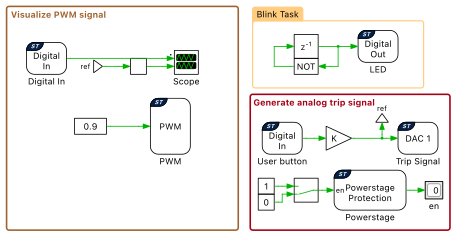
Fig. 2 Setup to generate a PWM signal on the target MCU.
Powerstage Protection Block
The powerstage_protection_stm32 implements an interlock, which is a safety mechanism, to enable or disable all the PWM outputs on the target MCU. After a start-up sequence, the PWM outputs rest disabled unless there is a logical low to high transition on the en input signal. This prevents the PWM signals from becoming active as soon as the code is executed on the target, thereby ensuring safe operation.
Each analog trip signal configured in the Protection tab of the Coder > Coder Options… window must be handled in the Powerstage Protection block. The Powerstage Protection block can either ignore the trip signal or disable the PWM signal generation if set to Disable powerstage (one-shot). The configuration of the analog trip signal is described in the following section.
Each trip event, to which the Powerstage Protection block reacts, is latched and can only be cleared by cycling the en input signal of the Powerstage Protection block from low to high.
Note
The effect that the Powerstage Protection block has on the individual PWM signals is not represented in an offline simulation and needs to be separately implemented by the user. An example is shown in the Help section of the Powerstage Protection block and also in Fig. 4.
Analog Protection Signal Configuration
One analog protection signal is enabled for each target MCU in the Protection tab of the Coder > Coder Options… window. The mechanism and the behavior of the analog protection is shown in Fig. 3. Each analog protection signal has a fault threshold level defining the maximum admissible voltage. This threshold signal is set by a DAC which is internally connected to the negative input pad of an internal comparator. The sense pin is typically connected to a current or voltage measurement signal and is internally routed to the positive input pad of the comparator. If the trip behaviour is set to Trip if signal is above threshold the comparator output will go to logic high if the signal at the sense pin exceeds the threshold limit. This transition will shut down all PWM outputs by forcing them into the safe state.
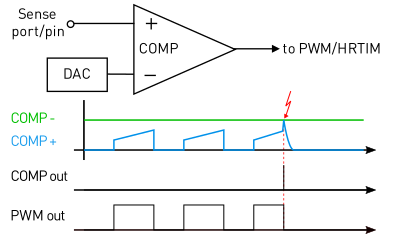
Fig. 3 Reaction to an analog protection signal
Note
The effect of the Analog Protection Signals on the individual PWM outputs is not represented in an offline simulation and needs to be separately implemented by the user. An example is shown in Fig. 4. The PWM output is wired to a Signal Switch and is enabled as soon as the Powerstage Protection detects a low to high transition at the en input. If the current flowing through the MOSFET (measured by the Ammeter) exceeds the defined trip level, the comparator changes the output to logic “high” and the PWM output is disabled. The PWM output is released again if the fault situation is cleared and the Powerstage Protection block is re-enabled.
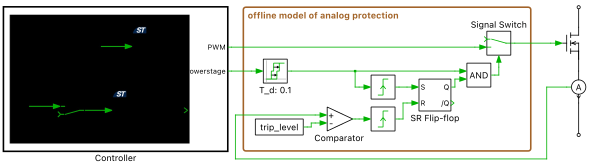
Fig. 4 Offline implementation of an analog protection signal
Trip Signal Simulation
In this demo, the sense signal, i.e. the current or voltage measurement, is emulated by a dac_stm32. This representative sense signal must be connected to the positive input pin of the internal analog comparator, i.e. the sense pin.
Simulation
Each subsystem can be directly converted into target specific code for the corresponding STM32 hardware.
Connect the hardware
Connect the pins as indicated in Fig. 5 by using two jumper wires. These connections will feedback the generated PWM signal to the Digital In to visualize the PWM waveform and connects the analog waveform generated by the dac_stm32 to the positive pin of the internal analog comparator.
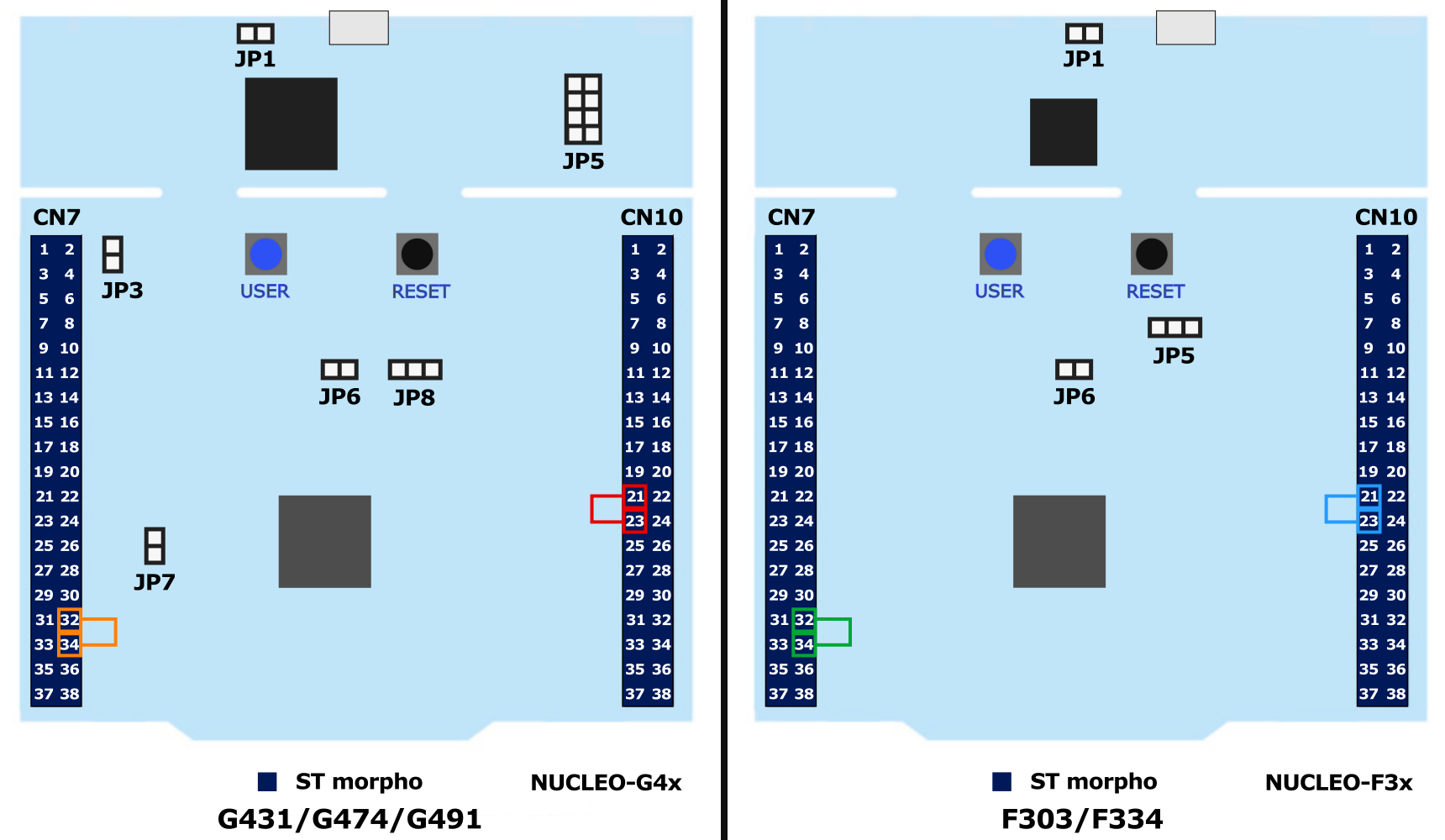
Fig. 5 Jumper wire connections to test the analog protection feature
Flash the MCU
Follow the instructions below to upload one of the subsystems to an STM32 MCU.
Connect the desired MCU to the host computer through a USB cable.
Open the Coder > Coder Options… window, and in the System menu on the left-hand side, select the MCU of interest.
Click Build to
Build and Programthe MCU directly from PLECS.
Note
If programmed correctly, the green LED (LD2) on the STM32 board should blink.
External Mode
Once the generated code is running on the STM32 target and the jumper wires are connected, the user can enter the External Mode to update the Display block and Scopes in the PLECS application with real-time values and change certain simulation parameters. The steps below outline how to connect to the target device, with additional debugging details provided in the “Start the External Mode” section of the user manual [6].
First, open the Coder > Coder Options… window, and from the System menu on the left-hand side, select the desired MCU drop down.
Next, from the External Mode tab, click Connect.
Next, click Activate autotriggering to observe the results in the Scope and Display block.
Real-time values can now be viewed in the Scope and Display block found within the subsystem of the selected MCU.
Parameter Inlining
Certain values on the target device can be changed in real-time, if the component is added to the “Exceptions” list found in the Parameter Inlining tab of the Coder > Coder Options… window, prior to building the model.
In this case, the Manual Switch can be changed when connected to the target device via the External Mode. Toggling the Manual switch from 0 to 1 allows enabling the PWM signal generation by providing the en signal to the powerstage_protection_stm32.
The configured analog protection signal will trip once the blue “User” button is pushed on the NUCLEO board. After pushing the button, the DAC will output a voltage slightly higher than the configured fault threshold value. Due to this, the output state of the comparator will go to logic high and a trip signal is propagated on the MCU to the PWM peripheral. After a few system clock cycles all PWM outputs of the model will be forced into the safe-state (inactive level). To reactivate the PWM signal toggle the manual switch again from 0 to 1.
Conclusion
This model demonstrates a typical configuration for over-current and over-voltage protection on STM32 MCUs. An analog protection signal can turn off PWM outputs in a few system clock cycles. This allows the efficient protection of the powerstage during fault conditions.
Bibliography
[1]
NUCLEO-G431RB, URL: https://www.st.com/en/evaluation-tools/nucleo-g431rb.
[2]
NUCLEO-G474RE, URL: https://www.st.com/en/evaluation-tools/nucleo-g474re.
[3]
NUCLEO-G491RE, URL: https://www.st.com/en/evaluation-tools/nucleo-g491re.
[4]
NUCLEO-F303RE, URL: https://www.st.com/en/evaluation-tools/nucleo-f303re.
[5]
NUCLEO-F334R8, URL: https://www.st.com/en/evaluation-tools/nucleo-f334r8.
[6]
STM32 Target Support Online Help: Quick Start.