Pulse Capture
Purpose
Time-stamp edges of a pulse train
Library
STM32
Description

The capture blocks allows timestamping signal transitions (events) on input pins, e.g. for period and/or duty cycle measurements. The timestamps are made available on the block output c.
The output v is 1 for one simulation step after an event has been triggered, 0 otherwise. The output o is set to 1 if more than one capture event happened during the last model step. This indicates an overcapture state. It is not possible to deduce how many times the event was capture in the last model step. Overcapture events should therefore be avoided to ensure a reliable pulse detection. The output o is automatically cleared after it has been read.
The pulse capture block can be used in either PWM capture Mode or as Individual channels.
In PWM capture mode, one channel of the selected TIM unit can be used to get information about the period and duty cycle of the captured PWM signal. The first signal of the c output reflects the measured period, the second signal of the c output can be used to calculate the duty cycle.
When configured as Individual channels, up to three channels can be used to capture edges on individual signals. Also, the outputs c, v and o are vectorized signals if the block uses multiple channels.
The figure below illustrates with an example how the different output signals behave if Mode is set to Individual channels.
The channels 1 and 2 are configured as described in the following table:
Channel |
Edge |
Prescale |
|---|---|---|
1 |
Rising |
every 2nd event |
2 |
Falling |
every 4th event |
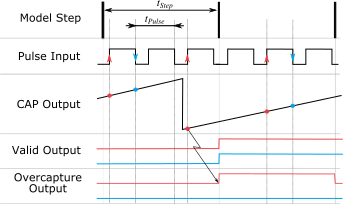
Fig. 28 An illustrative example for different capture settings when the Pulse Capture block is used with individual channels (channel 1 in red, channel 2 in blue).
If multiple capture events happen inside a model step the overcapture output will output a 1 at the end of the respective model step. The counter is operated in free-running mode and therefore not reset by a capture event. To calculate the period of the pulse input signal one has to calculate the difference between two consecutive capture events.
Parameters
Main
- TIM unit
Selects the timer unit to use.
- Mode
Specifies the desired capture mode. If set to
Individual channelsthe channels of the selected TIM unit can be used to capture up to three individual signals. ThePWM capturemode facilitates the measurement of frequency and duty cycle. In PWM capture mode exactly one Channel has to be enabled.- Clock prescale
Specifies the desired prescale value.
Channel 1/2/3
- Capture
Provides an option to disable or enable an input channel.
- Edge
The edge detection trigger can be set on Rising, Falling or Either.
- Prescale
Specifies the desired prescale value for an individual channel.
- Port
Selects the port name of the capture channel.
- Pin
Defines the pin number of the capture channel.