Edge Counter
Purpose
Count edges of a pulse train
Library
STM32
Description

The Edge Counter block counts edges of an external signal. It can be configured to count rising or falling edges only or both. The output of this block then shows the counter value at the time it was read. The counter value can be reset by an optional block input to the configured Initial condition value.
In the Single channel + Direction counting Mode the counter counts up or down depending on the signal level on the direction input pin. The counter is incremented if the signal level is logic 1, and decremented if the level is logic 0 at the direction pin.
An example is shown in the figure below. The counter is configured as Single channel + Direction, and reacts to the rising edge only. Every time a rising edge is detected, the counter value is incremented or decremented according to the direction pin signal level. Each task period the actual counter value is read and output at the block output terminal.
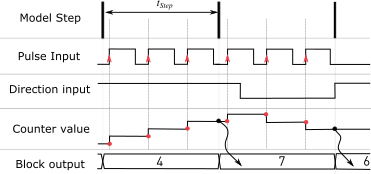
Fig. 16 Edge counter value in function of direction signal
Parameters
Main
- TIM unit
Selects the timer unit used. All timer units are 16-bit counters, except TIM unit 5 is a 32-bit counter.
- Maximum counter value
The counter is reset to zero when it has reached the Maximum counter value and detects an input edge in the positive direction. The counter is set to the Maximum counter value when it is zero and detects an input edge in the negative direction.
- Mode
Selects whether the counter should count in positive direction only (
Single channel) or should change the counting direction based on an additional Direction signal (Single channel + Direction). The counter increments its value when the Direction signal is logic1, and decrements when the direction signal is logic0.- External reset
The external reset selects the behaviour of the external reset input. The values rising, falling and either cause a reset of the counter to its Initial condition on the rising, falling or both edges of the reset signal. A rising edge is detected when the signal changes from \(0\) to a positive value, a falling edge is detected when the signal changes from a positive value to \(0\). If set to
nonethe counter value cannot be reset by software.- Initial condition
The initial condition allows to choose the start value of the counter. The initial condition is loaded at the beginning of a simulation or after a reset.
Channel
- Edge
The edge detection trigger can be set on
Rising,FallingorEither.- Port
Selects the port name.
- Pin
Defines the pin number.
- Input characteristic
Specifies whether an internal pull-up or pull-down resistor is connected to the input pin. If
high impedanceis selected no internal pull resistor is connected.
Direction
- Port
Selects the port name of the direction signal.
- Pin
Defines the pin number of the direction signal.
- Input characteristic
Specifies whether an internal pull-up or pull-down resistor is connected to the input pin. If
high impedanceis selected no internal pull resistor is connected.